<?xml version="1.0" encoding="utf-8"?>
<feed xmlns="http://www.w3.org/2005/Atom">
    <id>https://blog.xiazhiri.com/</id>
    <title>夏之日</title>
    <updated>2026-08-15T08:04:40.824Z</updated>
    <generator>https://github.com/jpmonette/feed</generator>
    <author>
        <name>likaci</name>
        <email>j2jm2ky9@duck.com</email>
        <uri>https://blog.xiazhiri.com</uri>
    </author>
    <link rel="alternate" href="https://blog.xiazhiri.com/"/>
    <subtitle>夏之日</subtitle>
    <icon>https://blog.xiazhiri.com/favicon.svg</icon>
    <rights>All rights reserved 2026, likaci</rights>
    <entry>
        <title type="html"><![CDATA[nRF52, Amiibo, Espruino, 电压毛刺攻击 与 Apple Find My]]></title>
        <id>https://blog.xiazhiri.com/nrf52-amiibo-voltage-glitch-and-apple-find-my</id>
        <link href="https://blog.xiazhiri.com/nrf52-amiibo-voltage-glitch-and-apple-find-my"/>
        <updated>2024-05-16T16:00:00.000Z</updated>
        <summary type="html"><![CDATA[前段时间随海运包裹买了一个 Amiloop, 拆开发现芯片是 nRF52832. 惊叹国产设备把成本压到极限, 一个17块钱的设备就能搞定蓝牙和NFC的功能.
进一步的探索发现很多有趣的事情, 这个小设备不仅可以模拟 Amiibo, 还可以烧录 Espruino 固件作为 传感器 / 蓝牙Beacon / 模拟 AirTag, 甚至可以通过 Apple Find My 网络进行离线数据上报.]]></summary>
        <content type="html"><![CDATA[<main class="notion light-mode notion-page notion-block-b6762efe670740b9a5cc4809c60b09c6"><div class="notion-viewport"></div><div class="notion-collection-page-properties"><div class="notion-collection-row"><div class="notion-collection-row-body"><div class="notion-collection-row-property"><div class="notion-collection-column-title"><svg viewBox="0 0 14 14" class="notion-collection-column-title-icon"><path d="M10.889 5.5H3.11v1.556h7.778V5.5zm1.555-4.444h-.777V0H10.11v1.056H3.89V0H2.333v1.056h-.777c-.864 0-1.548.7-1.548 1.555L0 12.5c0 .856.692 1.5 1.556 1.5h10.888C13.3 14 14 13.356 14 12.5V2.611c0-.855-.7-1.555-1.556-1.555zm0 11.444H1.556V3.944h10.888V12.5zM8.556 8.611H3.11v1.556h5.445V8.61z"></path></svg><div class="notion-collection-column-title-body">date</div></div><div class="notion-collection-row-value"><span class="notion-property notion-property-date">May 17, 2024</span></div></div><div class="notion-collection-row-property"><div class="notion-collection-column-title"><svg viewBox="0 0 14 14" class="notion-collection-column-title-icon"><path d="M7 4.568a.5.5 0 00-.5-.5h-6a.5.5 0 00-.5.5v1.046a.5.5 0 00.5.5h6a.5.5 0 00.5-.5V4.568zM.5 1a.5.5 0 00-.5.5v1.045a.5.5 0 00.5.5h12a.5.5 0 00.5-.5V1.5a.5.5 0 00-.5-.5H.5zM0 8.682a.5.5 0 00.5.5h11a.5.5 0 00.5-.5V7.636a.5.5 0 00-.5-.5H.5a.5.5 0 00-.5.5v1.046zm0 3.068a.5.5 0 00.5.5h9a.5.5 0 00.5-.5v-1.045a.5.5 0 00-.5-.5h-9a.5.5 0 00-.5.5v1.045z"></path></svg><div class="notion-collection-column-title-body">slug</div></div><div class="notion-collection-row-value"><span class="notion-property notion-property-text">nrf52-amiibo-voltage-glitch-and-apple-find-my</span></div></div><div class="notion-collection-row-property"><div class="notion-collection-column-title"><svg viewBox="0 0 14 14" class="notion-collection-column-title-icon"><path d="M7 13A6 6 0 107 1a6 6 0 000 12zM3.751 5.323A.2.2 0 013.909 5h6.182a.2.2 0 01.158.323L7.158 9.297a.2.2 0 01-.316 0L3.751 5.323z"></path></svg><div class="notion-collection-column-title-body">status</div></div><div class="notion-collection-row-value"><span class="notion-property notion-property-select"><div class="notion-property-select-item notion-item-red">Published</div></span></div></div><div class="notion-collection-row-property"><div class="notion-collection-column-title"><svg viewBox="0 0 14 14" class="notion-collection-column-title-icon"><path d="M4 3a1 1 0 011-1h7a1 1 0 110 2H5a1 1 0 01-1-1zm0 4a1 1 0 011-1h7a1 1 0 110 2H5a1 1 0 01-1-1zm0 4a1 1 0 011-1h7a1 1 0 110 2H5a1 1 0 01-1-1zM2 4a1 1 0 110-2 1 1 0 010 2zm0 4a1 1 0 110-2 1 1 0 010 2zm0 4a1 1 0 110-2 1 1 0 010 2z"></path></svg><div class="notion-collection-column-title-body">tags</div></div><div class="notion-collection-row-value"><span class="notion-property notion-property-multi_select"><div class="notion-property-multi_select-item notion-item-brown">nRF52</div><div class="notion-property-multi_select-item notion-item-gray">Amiibo</div><div class="notion-property-multi_select-item notion-item-green">Hardware</div></span></div></div><div class="notion-collection-row-property"><div class="notion-collection-column-title"><svg viewBox="0 0 14 14" class="notion-collection-column-title-icon"><path d="M7 4.568a.5.5 0 00-.5-.5h-6a.5.5 0 00-.5.5v1.046a.5.5 0 00.5.5h6a.5.5 0 00.5-.5V4.568zM.5 1a.5.5 0 00-.5.5v1.045a.5.5 0 00.5.5h12a.5.5 0 00.5-.5V1.5a.5.5 0 00-.5-.5H.5zM0 8.682a.5.5 0 00.5.5h11a.5.5 0 00.5-.5V7.636a.5.5 0 00-.5-.5H.5a.5.5 0 00-.5.5v1.046zm0 3.068a.5.5 0 00.5.5h9a.5.5 0 00.5-.5v-1.045a.5.5 0 00-.5-.5h-9a.5.5 0 00-.5.5v1.045z"></path></svg><div class="notion-collection-column-title-body">summary</div></div><div class="notion-collection-row-value"><span class="notion-property notion-property-text">前段时间随海运包裹买了一个 Amiloop, 拆开发现芯片是 nRF52832. 惊叹国产设备把成本压到极限, 一个17块钱的设备就能搞定蓝牙和NFC的功能.
进一步的探索发现很多有趣的事情, 这个小设备不仅可以模拟 Amiibo, 还可以烧录 <a target="_blank" rel="noopener noreferrer" class="notion-link" href="https://www.espruino.com/">Espruino</a> 固件作为 传感器 / 蓝牙Beacon / 模拟 AirTag, 甚至可以通过 Apple Find My 网络进行离线数据上报.</span></div></div><div class="notion-collection-row-property"><div class="notion-collection-column-title"><svg viewBox="0 0 14 14" class="notion-collection-column-title-icon"><path d="M7 13A6 6 0 107 1a6 6 0 000 12zM3.751 5.323A.2.2 0 013.909 5h6.182a.2.2 0 01.158.323L7.158 9.297a.2.2 0 01-.316 0L3.751 5.323z"></path></svg><div class="notion-collection-column-title-body">type</div></div><div class="notion-collection-row-value"><span class="notion-property notion-property-select"><div class="notion-property-select-item notion-item-purple">Post</div></span></div></div></div></div></div><div class="notion-text notion-block-f8a45d3f13d54060b4d348cb8ef401c5">前段时间随海运包裹寄了一个 Amiloop 用来打塞尔达, 收到拆开发现芯片是 nRF52832. 震惊国产设备把成本压到极限, 一个17块钱的设备就能搞定蓝牙和NFC的功能.</div><div class="notion-text notion-block-08113b24b8cc469a9f3f70c93f126e40">进一步的探索发现很多有趣的事情, 这个小设备不仅可以模拟 Amiibo, 还可以烧录 <a target="_blank" rel="noopener noreferrer" class="notion-link" href="https://www.espruino.com/">Espruino</a> 作为 传感器 / 蓝牙Beacon / 模拟 AirTag, 甚至可以通过 Apple Find My 网络进行离线数据上报.</div><h3 class="notion-h notion-h2 notion-h-indent-0 notion-block-a32d9096cbe849f6b59b616ca324bc94" data-id="a32d9096cbe849f6b59b616ca324bc94"><span><div id="a32d9096cbe849f6b59b616ca324bc94" class="notion-header-anchor"></div><a class="notion-hash-link" href="#a32d9096cbe849f6b59b616ca324bc94" title="模拟 Amiiibo"><svg viewBox="0 0 16 16" width="16" height="16"><path fill-rule="evenodd" d="M7.775 3.275a.75.75 0 001.06 1.06l1.25-1.25a2 2 0 112.83 2.83l-2.5 2.5a2 2 0 01-2.83 0 .75.75 0 00-1.06 1.06 3.5 3.5 0 004.95 0l2.5-2.5a3.5 3.5 0 00-4.95-4.95l-1.25 1.25zm-4.69 9.64a2 2 0 010-2.83l2.5-2.5a2 2 0 012.83 0 .75.75 0 001.06-1.06 3.5 3.5 0 00-4.95 0l-2.5 2.5a3.5 3.5 0 004.95 4.95l1.25-1.25a.75.75 0 00-1.06-1.06l-1.25 1.25a2 2 0 01-2.83 0z"></path></svg></a><span class="notion-h-title">模拟 Amiiibo</span></span></h3><div class="notion-text notion-block-a5206937523a4e5a8616d2e2cf8eeca1">之前因为家人着迷于动物森友会, 经常要用 Amiibo 邀请小动物到岛上. 研究市面上的模拟 Amiibo 的方案, 大概包括以下几种.</div><ul class="notion-list notion-list-disc notion-block-f45167f814144683bfcd184c7d35e5ba"><li><b>NTAG 215
</b>Amiibo 的本质是一个 NTAG 215 标签, 淘宝上很多印刷好的卡片可以直接用, 也有空白卡片可以使用手机 <a target="_blank" rel="noopener noreferrer" class="notion-link" href="https://github.com/HiddenRamblings/TagMo">TagMo</a> 写入数据, 成本大概0.5元/张. 缺点就是卡片只能写入一次, 需要管理一堆实体卡片.</li></ul><ul class="notion-list notion-list-disc notion-block-c5edb2252d184ca4b4b592231033666c"><li><b>NFC 协议</b>
通过 NFC 模拟 Amiibo, 除了上面提到十几块钱的 Amiloop / AmiiboLink 之外还有几百元的 N2 Elite 和 PowerTag 等. 甚至还有使用 3DS 模拟的方案 <a target="_blank" rel="noopener noreferrer" class="notion-link" href="https://github.com/HubSteven/3ds_ir">HubSteven/3ds_ir</a>. 基本逻辑就是通过电脑/手机连接设备, 写入需要的 Amiibo 数据, 通过 NFC 模拟收发数据. 
这样可以做到无限刷写, 目前看来最好用的方案.</li></ul><ul class="notion-list notion-list-disc notion-block-c5a0035bded949b6a4b4bf2ea44874b3"><li><b>蓝牙 协议
</b>因为 Switch 的 NFC 模块是集成在手柄中的, 所以通过蓝牙模拟手柄冒充正常手柄发送 Amiibo 的数据. 包括使用树莓派模拟 Joy-Con 的 <a target="_blank" rel="noopener noreferrer" class="notion-link" href="https://github.com/mart1nro/joycontrol">mart1nro/joycontrol</a>, 但可惜因为开源协议的问题移除这部分支持<a target="_blank" rel="noopener noreferrer" class="notion-link" href="https://github.com/mart1nro/joycontrol/issues/80">#80</a>, 使用需要自己revert代码. 
同样还有使用ESP32 模拟手柄的 <a target="_blank" rel="noopener noreferrer" class="notion-link" href="https://github.com/EasyConNS/EasyMCU_ESP32">EasyMCU_ESP32</a>, 固件代码没有开源. 作者有几篇关于 Joycon 模拟很好的文章 <a target="_blank" rel="noopener noreferrer" class="notion-link" href="https://elmagnifico.tech/2022/09/07/ESP32-Simulate-NS-JoyCon-Amiibo/">ESP32模拟JoyCon和Pro, 兼容Amiibo</a> 和 <a target="_blank" rel="noopener noreferrer" class="notion-link" href="https://elmagnifico.tech/2022/09/13/Amiibo-Simulation-Fake/">Amiibo Fake</a>.
还有使用 Android手机 模拟蓝牙手柄的方案, 但是只能特定的机型才能实现.
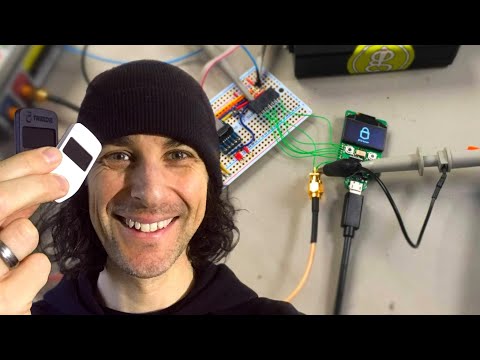
这种方式缺点是操作有些麻烦, 因为每次用都要像连接手柄一样操作.</li></ul><h3 class="notion-h notion-h2 notion-h-indent-0 notion-block-11a96b7562e24d3d83bd620230693392" data-id="11a96b7562e24d3d83bd620230693392"><span><div id="11a96b7562e24d3d83bd620230693392" class="notion-header-anchor"></div><a class="notion-hash-link" href="#11a96b7562e24d3d83bd620230693392" title="Espruino"><svg viewBox="0 0 16 16" width="16" height="16"><path fill-rule="evenodd" d="M7.775 3.275a.75.75 0 001.06 1.06l1.25-1.25a2 2 0 112.83 2.83l-2.5 2.5a2 2 0 01-2.83 0 .75.75 0 00-1.06 1.06 3.5 3.5 0 004.95 0l2.5-2.5a3.5 3.5 0 00-4.95-4.95l-1.25 1.25zm-4.69 9.64a2 2 0 010-2.83l2.5-2.5a2 2 0 012.83 0 .75.75 0 001.06-1.06 3.5 3.5 0 00-4.95 0l-2.5 2.5a3.5 3.5 0 004.95 4.95l1.25-1.25a.75.75 0 00-1.06-1.06l-1.25 1.25a2 2 0 01-2.83 0z"></path></svg></a><span class="notion-h-title">Espruino</span></span></h3><div class="notion-text notion-block-eb816ea0ecfa4addbdeb34779a6c1f07">在这篇帖子 <a target="_blank" rel="noopener noreferrer" class="notion-link" href="https://forum.espruino.com/conversations/388395/">AmiiboLink / AmiLoop</a> 中发现 nRF52 可以刷 espruino.</div><div class="notion-text notion-block-c8fc9b71240b4064890d20c3bf169a3a">与 Arduino 不同, 这个项目实现了一个js解释器, 用网页作为IDE <a target="_blank" rel="noopener noreferrer" class="notion-link" href="https://www.espruino.com/ide/">Espruino.com IDE</a>, 通过浏览器 Web Bluetooth 连接设备. 开发过程中甚至不需要插数据线, 整体门槛比 Arduino 还要低. 甚至有自己的”<a target="_blank" rel="noopener noreferrer" class="notion-link" href="https://espruino.github.io/EspruinoApps/">应用商店</a>”. 其中有几个好玩的示例 通过检测电力表的led闪烁计算用电量 <a target="_blank" rel="noopener noreferrer" class="notion-link" href="https://www.espruino.com/Smart+Meter">Smart Meter</a> 和 模拟 AirTag 的 <a target="_blank" rel="noopener noreferrer" class="notion-link" href="https://github.com/espruino/EspruinoApps/tree/master/apps/openhaystack">apps/openhaystack</a></div><div class="notion-text notion-block-1360b251cb2e4462a09d5b83d290ca6f">AmiLoop 可以作为 Puck.js <a target="_blank" rel="noopener noreferrer" class="notion-link" href="https://www.puck-js.com/">https://www.puck-js.com/</a> 使用烧录espruino固件. 根据 DanTheMan827 提供的 <a target="_blank" rel="noopener noreferrer" class="notion-link" href="https://forum.espruino.com/comments/17073117/">配置</a> , 使用 Github Action 可以方便的编译固件. </div><div class="notion-text notion-block-a55e8a7a595f4bb5960e02b190f87b55">下面是我编译好的固件</div><div class="notion-file notion-block-d599787e056d43c9b5e1a98c4e1baccb"><a target="_blank" rel="noopener noreferrer" class="notion-file-link" href="https://file.notion.com/f/f/74874109-3f4a-47e8-bd21-d244a829d694/b6efad76-49a4-4c3f-90fb-11dfc3cc34ba/espruino_2v21.19_amiibolink.hex?table=block&amp;id=d599787e-056d-43c9-b5e1-a98c4e1baccb&amp;spaceId=74874109-3f4a-47e8-bd21-d244a829d694&amp;expirationTimestamp=1786809600000&amp;signature=GwjNFACKTr_MoleCC92hrjUn4SHpmlKz6qInzyjrPoU"><svg class="notion-file-icon" viewBox="0 0 30 30"><path d="M22,8v12c0,3.866-3.134,7-7,7s-7-3.134-7-7V8c0-2.762,2.238-5,5-5s5,2.238,5,5v12c0,1.657-1.343,3-3,3s-3-1.343-3-3V8h-2v12c0,2.762,2.238,5,5,5s5-2.238,5-5V8c0-3.866-3.134-7-7-7S6,4.134,6,8v12c0,4.971,4.029,9,9,9s9-4.029,9-9V8H22z"></path></svg><div class="notion-file-info"><div class="notion-file-title">espruino_2v21.19_amiibolink.hex</div><div class="notion-file-size">1067.6KB</div></div></a></div><h3 class="notion-h notion-h2 notion-h-indent-0 notion-block-1ee8ed12f771445bb3959aff06ad1a0d" data-id="1ee8ed12f771445bb3959aff06ad1a0d"><span><div id="1ee8ed12f771445bb3959aff06ad1a0d" class="notion-header-anchor"></div><a class="notion-hash-link" href="#1ee8ed12f771445bb3959aff06ad1a0d" title="固件备份与烧录"><svg viewBox="0 0 16 16" width="16" height="16"><path fill-rule="evenodd" d="M7.775 3.275a.75.75 0 001.06 1.06l1.25-1.25a2 2 0 112.83 2.83l-2.5 2.5a2 2 0 01-2.83 0 .75.75 0 00-1.06 1.06 3.5 3.5 0 004.95 0l2.5-2.5a3.5 3.5 0 00-4.95-4.95l-1.25 1.25zm-4.69 9.64a2 2 0 010-2.83l2.5-2.5a2 2 0 012.83 0 .75.75 0 001.06-1.06 3.5 3.5 0 00-4.95 0l-2.5 2.5a3.5 3.5 0 004.95 4.95l1.25-1.25a.75.75 0 00-1.06-1.06l-1.25 1.25a2 2 0 01-2.83 0z"></path></svg></a><span class="notion-h-title"><b>固件备份与烧录</b></span></span></h3><div class="notion-text notion-block-c80f87232f84494084e18586ffd54103">AmiLoop 和 AmiiboLink 硬件一致, 固件可以通刷, 但是控制切换 Amiibo的 App 不能通用.</div><div class="notion-text notion-block-5b90b54ae3ba404aa5e04efddac5f835">目前原厂固件有 v3 v4两个版本, v4固件会启用 nRF 的芯片保护 APPPROTECT, 导致无法通过 swd 调试以及 dump 数据. 但是可以通过命令全擦除或者电压毛刺攻击来解除锁定.</div><a style="width:100%" href="https://imgur.com/a/amiloop-board-K8Wp6Rp" target="blank_"><figure class="notion-asset-wrapper notion-asset-wrapper-image notion-block-902d097642944b9f805caada445d130f"><div style="position:relative;display:flex;justify-content:center;align-self:center;width:576px;max-width:100%;flex-direction:column"><img style="object-fit:cover" src="https://www.notion.so/image/https%3A%2F%2Ffile.notion.com%2Ff%2Ff%2F74874109-3f4a-47e8-bd21-d244a829d694%2F9e46a880-4be5-45dd-9ddd-30e15a805884%2FUntitled.png%3Ftable%3Dblock%26id%3D902d0976-4294-4b9f-805c-aada445d130f%26spaceId%3D74874109-3f4a-47e8-bd21-d244a829d694%26expirationTimestamp%3D1786809600000%26signature%3DXjtkD3n6nRrey01q1Lfl4AFaluHhFBkWOWPdo0-PLss?table=block&amp;id=902d0976-4294-4b9f-805c-aada445d130f&amp;cache=v2" alt="https://imgur.com/a/amiloop-board-K8Wp6Rp" loading="lazy" decoding="async"/></div></figure></a><div class="notion-text notion-block-00185ee550cd466683aabdea8aff5972">因为 bootloader 不兼容, 需要使用 SWD 烧录, DAPLink / CMSIS-DAP 配置文件如下</div><div class="notion-text notion-block-6c6dd8ca06bc43d295290e2737e100d6">OpenOCD / telnet 备份/烧录/解锁的步骤如下</div><h3 class="notion-h notion-h2 notion-h-indent-0 notion-block-1eff6c50fe624936a07996d66746035f" data-id="1eff6c50fe624936a07996d66746035f"><span><div id="1eff6c50fe624936a07996d66746035f" class="notion-header-anchor"></div><a class="notion-hash-link" href="#1eff6c50fe624936a07996d66746035f" title="电压毛刺攻击 ( Voltage Glitch )"><svg viewBox="0 0 16 16" width="16" height="16"><path fill-rule="evenodd" d="M7.775 3.275a.75.75 0 001.06 1.06l1.25-1.25a2 2 0 112.83 2.83l-2.5 2.5a2 2 0 01-2.83 0 .75.75 0 00-1.06 1.06 3.5 3.5 0 004.95 0l2.5-2.5a3.5 3.5 0 00-4.95-4.95l-1.25 1.25zm-4.69 9.64a2 2 0 010-2.83l2.5-2.5a2 2 0 012.83 0 .75.75 0 001.06-1.06 3.5 3.5 0 00-4.95 0l-2.5 2.5a3.5 3.5 0 004.95 4.95l1.25-1.25a.75.75 0 00-1.06-1.06l-1.25 1.25a2 2 0 01-2.83 0z"></path></svg></a><span class="notion-h-title">电压毛刺攻击 ( Voltage Glitch )</span></span></h3><div class="notion-text notion-block-ce819fe9accc4239ada269970079fd2b">对于启用 APPPROTECT 后的 nRF52, 默认无法使用 SWD 进行调试或者 dump 数据. 而电压毛刺攻击是在恰好的时机改变芯片的供电, 使得芯片跳过一部分判断逻辑.</div><div class="notion-text notion-block-e5f754eedfaf4c67a9df4b043ee1108c">油管上 Joe Grand 的视频讲述了使用电压毛刺攻击冷钱包恢复价值 200万$ BTC 的故事. 
中间有大Hacker 忘记接地的搞笑错误, 最后有老婆孩子为他的成功一起开心的庆祝. 想起来小时候老爹教我用电烙铁焊收音机, 小朋友有一个动手能力爆棚的老爹真的是件很幸福的事情.</div><figure class="notion-asset-wrapper notion-asset-wrapper-video notion-block-6e12f02aa96e4e0f9909bdd2bc5d61f3"><div style="position:relative;display:flex;justify-content:center;align-self:center;width:100%;max-width:100%;flex-direction:column;padding-bottom:56.25%"><link rel="preload" href="https://i.ytimg.com/vi/dT9y-KQbqi4/hqdefault.jpg" as="image"/><div class="notion-yt-lite notion-asset-object-fit" style="object-fit:contain"><img src="https://i.ytimg.com/vi/dT9y-KQbqi4/hqdefault.jpg" class="notion-yt-thumbnail" alt="Video preview"/><div class="notion-yt-playbtn"></div></div></div></figure><div class="notion-blank notion-block-3a86c3bd7dc54006880e4401d75afb46"> </div><div class="notion-text notion-block-ceecfce6eafc4f69bae8deb3c893dbdd">对于 nRF52 atc1441 提供了一个更廉价的方式 <a target="_blank" rel="noopener noreferrer" class="notion-link" href="https://github.com/atc1441/ESP32_nRF52_SWD">ESP32_nRF52_SWD</a>, 仅使用 ESP32 和一个 MOS开关进行电压毛刺攻击, 甚至还有网页可以调整 glich 的时间间隔. 当然为了提高攻击成功率, 需要移除掉两个电容.
还记得小的时候玩红白机, 夏天傍晚电压低的时候, 游戏机出了错乱的马赛克, 误打误撞绕过了重装机兵里的一个关卡.</div><figure class="notion-asset-wrapper notion-asset-wrapper-image notion-block-e78e57f1da324f538dd7ccccd03962c5"><div style="position:relative;display:flex;justify-content:center;align-self:center;width:576px;max-width:100%;flex-direction:column"><img style="object-fit:cover" src="https://www.notion.so/image/https%3A%2F%2Ffile.notion.com%2Ff%2Ff%2F74874109-3f4a-47e8-bd21-d244a829d694%2F9337b826-6b97-4e55-a7dd-3615e02ac480%2FUntitled.png%3Ftable%3Dblock%26id%3De78e57f1-da32-4f53-8dd7-ccccd03962c5%26spaceId%3D74874109-3f4a-47e8-bd21-d244a829d694%26expirationTimestamp%3D1786809600000%26signature%3DymGRN4pthrg9ZWT2dSur5hGbPO7OrI-3hxRPJWOO3Fg?table=block&amp;id=e78e57f1-da32-4f53-8dd7-ccccd03962c5&amp;cache=v2" alt="notion image" loading="lazy" decoding="async"/></div></figure><h3 class="notion-h notion-h2 notion-h-indent-0 notion-block-1e629b66cbce4a53895d93d1403e26b8" data-id="1e629b66cbce4a53895d93d1403e26b8"><span><div id="1e629b66cbce4a53895d93d1403e26b8" class="notion-header-anchor"></div><a class="notion-hash-link" href="#1e629b66cbce4a53895d93d1403e26b8" title="Apple Find My 和 OpenHaystack"><svg viewBox="0 0 16 16" width="16" height="16"><path fill-rule="evenodd" d="M7.775 3.275a.75.75 0 001.06 1.06l1.25-1.25a2 2 0 112.83 2.83l-2.5 2.5a2 2 0 01-2.83 0 .75.75 0 00-1.06 1.06 3.5 3.5 0 004.95 0l2.5-2.5a3.5 3.5 0 00-4.95-4.95l-1.25 1.25zm-4.69 9.64a2 2 0 010-2.83l2.5-2.5a2 2 0 012.83 0 .75.75 0 001.06-1.06 3.5 3.5 0 00-4.95 0l-2.5 2.5a3.5 3.5 0 004.95 4.95l1.25-1.25a.75.75 0 00-1.06-1.06l-1.25 1.25a2 2 0 01-2.83 0z"></path></svg></a><span class="notion-h-title">Apple Find My 和 OpenHaystack</span></span></h3><div class="notion-text notion-block-e3f735ba74f948eea3e3ad76957bf8ad">前面提到 Espruino 可以模拟 AirTag, 使用 OpenHaystack 获取数据. 之前在海运包裹里放了国产平替的 AirTag AIYATO, 可以”实时”追踪包裹的位置. 平替的价格也是出奇的便宜, 只要20块钱. 当然因为没有超宽带技术, 没有办法精确定位. 对于钱包和宠物, 还是直接用 AirTag 比较好.</div><h4 class="notion-h notion-h3 notion-h-indent-1 notion-block-45f4e309d46646e5b74dbad1f4823b79" data-id="45f4e309d46646e5b74dbad1f4823b79"><span><div id="45f4e309d46646e5b74dbad1f4823b79" class="notion-header-anchor"></div><a class="notion-hash-link" href="#45f4e309d46646e5b74dbad1f4823b79" title="Find My 原理"><svg viewBox="0 0 16 16" width="16" height="16"><path fill-rule="evenodd" d="M7.775 3.275a.75.75 0 001.06 1.06l1.25-1.25a2 2 0 112.83 2.83l-2.5 2.5a2 2 0 01-2.83 0 .75.75 0 00-1.06 1.06 3.5 3.5 0 004.95 0l2.5-2.5a3.5 3.5 0 00-4.95-4.95l-1.25 1.25zm-4.69 9.64a2 2 0 010-2.83l2.5-2.5a2 2 0 012.83 0 .75.75 0 001.06-1.06 3.5 3.5 0 00-4.95 0l-2.5 2.5a3.5 3.5 0 004.95 4.95l1.25-1.25a.75.75 0 00-1.06-1.06l-1.25 1.25a2 2 0 01-2.83 0z"></path></svg></a><span class="notion-h-title">Find My 原理</span></span></h4><div class="notion-text notion-block-838950a012024d8a95525e0c1e233435">OpenHaystack 项目中有关于 Find My 网络的工作流程: AirTag 广播公钥 → 附近的 iPhone 接收到广播 → iPhone 把 GPS 位置用公钥加密,以及公钥 HASH 上传到Apple服务器 → AirTag主人的手机使用私钥解密位置数据.</div><a style="width:100%" href="https://github.com/seemoo-lab/openhaystack" target="blank_"><figure class="notion-asset-wrapper notion-asset-wrapper-image notion-block-54f04d917393449aa7b3cca049a3eaf3"><div style="position:relative;display:flex;justify-content:center;align-self:center;width:492px;max-width:100%;flex-direction:column"><img style="object-fit:cover" src="https://www.notion.so/image/https%3A%2F%2Ffile.notion.com%2Ff%2Ff%2F74874109-3f4a-47e8-bd21-d244a829d694%2F931f6b82-601d-4a93-b30d-f7c15bdb5b3b%2FUntitled.png%3Ftable%3Dblock%26id%3D54f04d91-7393-449a-a7b3-cca049a3eaf3%26spaceId%3D74874109-3f4a-47e8-bd21-d244a829d694%26expirationTimestamp%3D1786809600000%26signature%3D-_asLHeLvPCrPUp8lz4BOi7hqwrGNJeCk_g2atAsrXc?table=block&amp;id=54f04d91-7393-449a-a7b3-cca049a3eaf3&amp;cache=v2" alt="https://github.com/seemoo-lab/openhaystack" loading="lazy" decoding="async"/></div></figure></a><div class="notion-text notion-block-2407f8cc473e4278a8c26076990f69f7">为了防止重放攻击和通过广播被追踪的问题, AirTag 会定时轮替公钥. 
公钥轮替是与时间相关的, 设备掉电时钟丢失之后会使用 SECONDARY KEY, 当时钟同步之后会根据 PRIMARY KEY轮替. 实际测试 AirTag 也不会一直发送位置上报的广播, 只有离开主人一定时间后才会发送.
因为公钥轮替以及只会上传公钥的hash的数据, 所以除非 Apple 抛弃旧设备开发新协议, 否则很难屏蔽 OpenHeystack.</div><h4 class="notion-h notion-h3 notion-h-indent-1 notion-block-222ac41ce44747b1b15cc81a105e45dc" data-id="222ac41ce44747b1b15cc81a105e45dc"><span><div id="222ac41ce44747b1b15cc81a105e45dc" class="notion-header-anchor"></div><a class="notion-hash-link" href="#222ac41ce44747b1b15cc81a105e45dc" title="发送自定义数据"><svg viewBox="0 0 16 16" width="16" height="16"><path fill-rule="evenodd" d="M7.775 3.275a.75.75 0 001.06 1.06l1.25-1.25a2 2 0 112.83 2.83l-2.5 2.5a2 2 0 01-2.83 0 .75.75 0 00-1.06 1.06 3.5 3.5 0 004.95 0l2.5-2.5a3.5 3.5 0 00-4.95-4.95l-1.25 1.25zm-4.69 9.64a2 2 0 010-2.83l2.5-2.5a2 2 0 012.83 0 .75.75 0 001.06-1.06 3.5 3.5 0 00-4.95 0l-2.5 2.5a3.5 3.5 0 004.95 4.95l1.25-1.25a.75.75 0 00-1.06-1.06l-1.25 1.25a2 2 0 01-2.83 0z"></path></svg></a><span class="notion-h-title">发送自定义数据</span></span></h4><div class="notion-text notion-block-e5e25d390ef14cf682a26dc19093aa25">根据这套机制还可以发送自定义数据, 这样就可以在没有网络的地方放置一个感器发送数据. <a target="_blank" rel="noopener noreferrer" class="notion-link" href="https://github.com/dakhnod/FakeTag">dakhnod/FakeTag</a> 实现了一个信箱收信提醒的传感器. </div><a style="width:100%" href="https://github.com/dakhnod/FakeTag" target="blank_"><figure class="notion-asset-wrapper notion-asset-wrapper-image notion-block-a22a513c992642869f24a37671f0cb44"><div style="position:relative;display:flex;justify-content:center;align-self:center;width:528px;max-width:100%;flex-direction:column"><img style="object-fit:cover" src="https://www.notion.so/image/https%3A%2F%2Ffile.notion.com%2Ff%2Ff%2F74874109-3f4a-47e8-bd21-d244a829d694%2F56bed196-ede8-49b6-9b37-d0fb8c7a5b51%2FUntitled.png%3Ftable%3Dblock%26id%3Da22a513c-9926-4286-9f24-a37671f0cb44%26spaceId%3D74874109-3f4a-47e8-bd21-d244a829d694%26expirationTimestamp%3D1786809600000%26signature%3DuBqZKW9CLK4ZyNyAkivPyEvW_rrNyphGNxEAqv4O-1k?table=block&amp;id=a22a513c-9926-4286-9f24-a37671f0cb44&amp;cache=v2" alt="https://github.com/dakhnod/FakeTag" loading="lazy" decoding="async"/></div></figure></a><div class="notion-text notion-block-2d78ddab2e2d4ff581ed149314dc7b35">而 <a target="_blank" rel="noopener noreferrer" class="notion-link" href="https://github.com/positive-security/send-my">positive-security/send-my</a> 更粗暴/精妙, 直将 Apple 服务器作为存储, 发送端把数据的index和bit拼接成公钥, 接收端从服务器检查公钥的有无作为bit的0和1来接收消息.</div><a style="width:100%" href="https://positive.security/blog/send-my" target="blank_"><figure class="notion-asset-wrapper notion-asset-wrapper-image notion-block-f57a96b674eb466fbd1b4bb5868c8aeb"><div style="position:relative;display:flex;justify-content:center;align-self:center;width:576px;max-width:100%;flex-direction:column"><img style="object-fit:cover" src="https://www.notion.so/image/https%3A%2F%2Ffile.notion.com%2Ff%2Ff%2F74874109-3f4a-47e8-bd21-d244a829d694%2Fb0936261-d300-49f8-b675-673666fda32c%2FUntitled.png%3Ftable%3Dblock%26id%3Df57a96b6-74eb-466f-bd1b-4bb5868c8aeb%26spaceId%3D74874109-3f4a-47e8-bd21-d244a829d694%26expirationTimestamp%3D1786809600000%26signature%3DjzEyEKKbVPgSvg5UR-5CVLNweCkT_kxLCKiA7eIdSzs?table=block&amp;id=f57a96b6-74eb-466f-bd1b-4bb5868c8aeb&amp;cache=v2" alt="https://positive.security/blog/send-my" loading="lazy" decoding="async"/></div></figure></a><h4 class="notion-h notion-h3 notion-h-indent-1 notion-block-dae309d76a124ad79281a776dbd9413b" data-id="dae309d76a124ad79281a776dbd9413b"><span><div id="dae309d76a124ad79281a776dbd9413b" class="notion-header-anchor"></div><a class="notion-hash-link" href="#dae309d76a124ad79281a776dbd9413b" title="读取数据"><svg viewBox="0 0 16 16" width="16" height="16"><path fill-rule="evenodd" d="M7.775 3.275a.75.75 0 001.06 1.06l1.25-1.25a2 2 0 112.83 2.83l-2.5 2.5a2 2 0 01-2.83 0 .75.75 0 00-1.06 1.06 3.5 3.5 0 004.95 0l2.5-2.5a3.5 3.5 0 00-4.95-4.95l-1.25 1.25zm-4.69 9.64a2 2 0 010-2.83l2.5-2.5a2 2 0 012.83 0 .75.75 0 001.06-1.06 3.5 3.5 0 00-4.95 0l-2.5 2.5a3.5 3.5 0 004.95 4.95l1.25-1.25a.75.75 0 00-1.06-1.06l-1.25 1.25a2 2 0 01-2.83 0z"></path></svg></a><span class="notion-h-title">读取数据</span></span></h4><div class="notion-text notion-block-fe2d916aa4f948f0b1f681ff317075b7">OpenHeystack 需要借助 Mail 插件向 Apple 服务器发送请求(与旧版 <a target="_blank" rel="noopener noreferrer" class="notion-link" href="https://altstore.io/">AltStore</a> 类似), 而 Mail 插件在新版 macOS 中已经被弃用. 实测使用 <a target="_blank" rel="noopener noreferrer" class="notion-link" href="https://github.com/malmeloo/FindMy.py">malmeloo/FindMy.py</a> 和 <a target="_blank" rel="noopener noreferrer" class="notion-link" href="https://github.com/hajekj/OfflineFindRecovery">hajekj/OfflineFindRecovery</a> 可以顺利从服务器获取到数据.</div><div class="notion-text notion-block-e93332147174465a8aef3f0c0029f689">如果只是想获取 Find My 设备的位置记录可以直接使用 <a target="_blank" rel="noopener noreferrer" class="notion-link" href="https://github.com/fjxmlzn/FindMyHistory">fjxmlzn/FindMyHistory</a> 这个工具, 不过这个工具只能从本地读取新数据. 而从 Apple 服务器可以获取最近7天的记录.</div><div class="notion-text notion-block-9213accdb5c348d58767b2b17c7784ea">需要注意的是, OpenHeystack 虽然使用 Apple Find My 网络, 但是设备不会出现在 Find My App 中. 你可以通过 Keychain 获取到自己绑定设备的私钥, <a target="_blank" rel="noopener noreferrer" class="notion-link" href="https://github.com/malmeloo/FindMy.py/issues/4">FindMy.py/issues/4</a> 记录了如何从 Keychain 中获取绑定设备的私钥, 以及轮替公钥的计算方式.</div><h3 class="notion-h notion-h2 notion-h-indent-0 notion-block-ee2c18e1620f4ffba613dae5db5873ec" data-id="ee2c18e1620f4ffba613dae5db5873ec"><span><div id="ee2c18e1620f4ffba613dae5db5873ec" class="notion-header-anchor"></div><a class="notion-hash-link" href="#ee2c18e1620f4ffba613dae5db5873ec" title="结尾"><svg viewBox="0 0 16 16" width="16" height="16"><path fill-rule="evenodd" d="M7.775 3.275a.75.75 0 001.06 1.06l1.25-1.25a2 2 0 112.83 2.83l-2.5 2.5a2 2 0 01-2.83 0 .75.75 0 00-1.06 1.06 3.5 3.5 0 004.95 0l2.5-2.5a3.5 3.5 0 00-4.95-4.95l-1.25 1.25zm-4.69 9.64a2 2 0 010-2.83l2.5-2.5a2 2 0 012.83 0 .75.75 0 001.06-1.06 3.5 3.5 0 00-4.95 0l-2.5 2.5a3.5 3.5 0 004.95 4.95l1.25-1.25a.75.75 0 00-1.06-1.06l-1.25 1.25a2 2 0 01-2.83 0z"></path></svg></a><span class="notion-h-title">结尾</span></span></h3><div class="notion-text notion-block-bc012f87e68140528bcf77c99c7578e4">nRF52 功耗比 ESP32 要低一个数量级, 在电池供电的设备上优势明显. </div></main>]]></content>
    </entry>
    <entry>
        <title type="html"><![CDATA[中国之声《糖尿病自我健康管理》许樟荣 庄丽 音频打包下载]]></title>
        <id>https://blog.xiazhiri.com/self-health-management-of-diabetes</id>
        <link href="https://blog.xiazhiri.com/self-health-management-of-diabetes"/>
        <updated>2020-02-26T16:00:00.000Z</updated>
        <summary type="html"><![CDATA[前段时间家人体检发现血糖偏高已经到了糖尿病的边缘.
上年纪的人容易因为对疾病的认识不足导致过份害怕或者不重视疾病小病拖成大病.
在查了一些资料之后发现糖尿病比中学生物书中胰岛素/肝糖原/肌糖原要复杂的多. 想对上年纪的人讲清这些概念更是难上加难.]]></summary>
        <content type="html"><![CDATA[<main class="notion light-mode notion-page notion-block-ca79364bf2a24de0a8902efc374e3e3f"><div class="notion-viewport"></div><div class="notion-collection-page-properties"><div class="notion-collection-row"><div class="notion-collection-row-body"><div class="notion-collection-row-property"><div class="notion-collection-column-title"><svg viewBox="0 0 14 14" class="notion-collection-column-title-icon"><path d="M10.889 5.5H3.11v1.556h7.778V5.5zm1.555-4.444h-.777V0H10.11v1.056H3.89V0H2.333v1.056h-.777c-.864 0-1.548.7-1.548 1.555L0 12.5c0 .856.692 1.5 1.556 1.5h10.888C13.3 14 14 13.356 14 12.5V2.611c0-.855-.7-1.555-1.556-1.555zm0 11.444H1.556V3.944h10.888V12.5zM8.556 8.611H3.11v1.556h5.445V8.61z"></path></svg><div class="notion-collection-column-title-body">date</div></div><div class="notion-collection-row-value"><span class="notion-property notion-property-date">‣</span></div></div><div class="notion-collection-row-property"><div class="notion-collection-column-title"><svg viewBox="0 0 14 14" class="notion-collection-column-title-icon"><path d="M7 4.568a.5.5 0 00-.5-.5h-6a.5.5 0 00-.5.5v1.046a.5.5 0 00.5.5h6a.5.5 0 00.5-.5V4.568zM.5 1a.5.5 0 00-.5.5v1.045a.5.5 0 00.5.5h12a.5.5 0 00.5-.5V1.5a.5.5 0 00-.5-.5H.5zM0 8.682a.5.5 0 00.5.5h11a.5.5 0 00.5-.5V7.636a.5.5 0 00-.5-.5H.5a.5.5 0 00-.5.5v1.046zm0 3.068a.5.5 0 00.5.5h9a.5.5 0 00.5-.5v-1.045a.5.5 0 00-.5-.5h-9a.5.5 0 00-.5.5v1.045z"></path></svg><div class="notion-collection-column-title-body">slug</div></div><div class="notion-collection-row-value"><span class="notion-property notion-property-text">self-health-management-of-diabetes</span></div></div><div class="notion-collection-row-property"><div class="notion-collection-column-title"><svg viewBox="0 0 14 14" class="notion-collection-column-title-icon"><path d="M7 13A6 6 0 107 1a6 6 0 000 12zM3.751 5.323A.2.2 0 013.909 5h6.182a.2.2 0 01.158.323L7.158 9.297a.2.2 0 01-.316 0L3.751 5.323z"></path></svg><div class="notion-collection-column-title-body">status</div></div><div class="notion-collection-row-value"><span class="notion-property notion-property-select"><div class="notion-property-select-item notion-item-red">Published</div></span></div></div><div class="notion-collection-row-property"><div class="notion-collection-column-title"><svg viewBox="0 0 14 14" class="notion-collection-column-title-icon"><path d="M4 3a1 1 0 011-1h7a1 1 0 110 2H5a1 1 0 01-1-1zm0 4a1 1 0 011-1h7a1 1 0 110 2H5a1 1 0 01-1-1zm0 4a1 1 0 011-1h7a1 1 0 110 2H5a1 1 0 01-1-1zM2 4a1 1 0 110-2 1 1 0 010 2zm0 4a1 1 0 110-2 1 1 0 010 2zm0 4a1 1 0 110-2 1 1 0 010 2z"></path></svg><div class="notion-collection-column-title-body">tags</div></div><div class="notion-collection-row-value"><span class="notion-property notion-property-multi_select"><div class="notion-property-multi_select-item notion-item-default">Health</div></span></div></div><div class="notion-collection-row-property"><div class="notion-collection-column-title"><svg viewBox="0 0 14 14" class="notion-collection-column-title-icon"><path d="M7 4.568a.5.5 0 00-.5-.5h-6a.5.5 0 00-.5.5v1.046a.5.5 0 00.5.5h6a.5.5 0 00.5-.5V4.568zM.5 1a.5.5 0 00-.5.5v1.045a.5.5 0 00.5.5h12a.5.5 0 00.5-.5V1.5a.5.5 0 00-.5-.5H.5zM0 8.682a.5.5 0 00.5.5h11a.5.5 0 00.5-.5V7.636a.5.5 0 00-.5-.5H.5a.5.5 0 00-.5.5v1.046zm0 3.068a.5.5 0 00.5.5h9a.5.5 0 00.5-.5v-1.045a.5.5 0 00-.5-.5h-9a.5.5 0 00-.5.5v1.045z"></path></svg><div class="notion-collection-column-title-body">summary</div></div><div class="notion-collection-row-value"><span class="notion-property notion-property-text">前段时间家人体检发现血糖偏高已经到了糖尿病的边缘.
上年纪的人容易因为对疾病的认识不足导致过份害怕或者不重视疾病小病拖成大病.
在查了一些资料之后发现糖尿病比中学生物书中胰岛素/肝糖原/肌糖原要复杂的多. 想对上年纪的人讲清这些概念更是难上加难.</span></div></div><div class="notion-collection-row-property"><div class="notion-collection-column-title"><svg viewBox="0 0 14 14" class="notion-collection-column-title-icon"><path d="M7 13A6 6 0 107 1a6 6 0 000 12zM3.751 5.323A.2.2 0 013.909 5h6.182a.2.2 0 01.158.323L7.158 9.297a.2.2 0 01-.316 0L3.751 5.323z"></path></svg><div class="notion-collection-column-title-body">type</div></div><div class="notion-collection-row-value"><span class="notion-property notion-property-select"><div class="notion-property-select-item notion-item-purple">Post</div></span></div></div></div></div></div><div class="notion-text notion-block-199c647cfcd84cb7ab245b4642c38ecc">前段时间家人体检发现血糖偏高已经到了糖尿病的边缘.
上年纪的人容易因为对疾病的认识不足导致过份害怕或者不重视疾病小病拖成大病.
在查了一些资料之后发现糖尿病比中学生物书中胰岛素/肝糖原/肌糖原要复杂的多. 想对上年纪的人讲清这些概念更是难上加难.</div><div class="notion-text notion-block-7903004f54264acb970e82ff6110d49d">播客里搜到许樟荣教授在“中国之声”广播中的系列讲座做得很好.
从国内的糖尿病现状到高血糖的长期危害再到如何自我管理最终成为糖尿病的&quot;主人&quot;.
解放军306医院专家的名头正好符合家长对权威的定义.
配合 <a target="_blank" rel="noopener noreferrer" class="notion-link" href="https://u.jd.com/YtUl4l">糖尿病自我健康管理——《中国之声》对话录</a> <b>实体书</b>一起效果更佳.</div><div class="notion-text notion-block-aae4df2d525e4c6f96fc82c21dedf1bf">音频是从 Podcast <a target="_blank" rel="noopener noreferrer" class="notion-link" href="https://podcasts.apple.com/cn/podcast/%E5%85%BB%E7%94%9F%E5%A4%A7%E8%AE%B2%E5%A0%82/id806906713">养生大讲堂 中国广播Radio.cn</a> 下载整理而来, 顺序可能不一定对, 也可能有遗漏.</div><div class="notion-text notion-block-75d157778a514be7859cfc5c5342af5d">版权归 &quot;中国之声/中国广播&quot; 所有, 如有侵权请联系我删除.
祝你和你的家人健康.</div><div class="notion-text notion-block-d27c18e028974de3b78ad0852fbef8cf">糖尿病的自我健康管理-许樟荣-306医院-mp3
链接: <a target="_blank" rel="noopener noreferrer" class="notion-link" href="https://pan.baidu.com/s/1Fdb6Az6xsieidYKr7Oon-Q">https://pan.baidu.com/s/1Fdb6Az6xsieidYKr7Oon-Q</a>
提取码: 23wt</div><div class="notion-text notion-block-a718957405074f15bc56c3eac1031763">糖尿病的自我健康管理-许樟荣-306医院-m4a
链接: <a target="_blank" rel="noopener noreferrer" class="notion-link" href="https://pan.baidu.com/s/1xmvk9kd1n_ljbHhTC4NLew">https://pan.baidu.com/s/1xmvk9kd1n_ljbHhTC4NLew</a>
提取码: rre7</div></main>]]></content>
    </entry>
    <entry>
        <title type="html"><![CDATA[水星 Mercury MIPC251C-4 网络摄像头 ONVIF 与 PTZ 云台控制]]></title>
        <id>https://blog.xiazhiri.com/Mercury-MIPC251C-4-Reverse</id>
        <link href="https://blog.xiazhiri.com/Mercury-MIPC251C-4-Reverse"/>
        <updated>2019-07-22T16:00:00.000Z</updated>
        <summary type="html"><![CDATA[最近在 什么值得买 上发现一款水星的网络摄像头, 除了支持云台/夜视功能之外, 还标明支持 onvif 协议. 所以想着买来接入到 HomeAssistat 作为监控使用.
可到手之后发现事情并没有那么简单, 记录如下.]]></summary>
        <content type="html"><![CDATA[<main class="notion light-mode notion-page notion-block-f7a1339161ee46f8b74d7a6ff5add910"><div class="notion-viewport"></div><div class="notion-collection-page-properties"><div class="notion-collection-row"><div class="notion-collection-row-body"><div class="notion-collection-row-property"><div class="notion-collection-column-title"><svg viewBox="0 0 14 14" class="notion-collection-column-title-icon"><path d="M10.889 5.5H3.11v1.556h7.778V5.5zm1.555-4.444h-.777V0H10.11v1.056H3.89V0H2.333v1.056h-.777c-.864 0-1.548.7-1.548 1.555L0 12.5c0 .856.692 1.5 1.556 1.5h10.888C13.3 14 14 13.356 14 12.5V2.611c0-.855-.7-1.555-1.556-1.555zm0 11.444H1.556V3.944h10.888V12.5zM8.556 8.611H3.11v1.556h5.445V8.61z"></path></svg><div class="notion-collection-column-title-body">date</div></div><div class="notion-collection-row-value"><span class="notion-property notion-property-date">‣</span></div></div><div class="notion-collection-row-property"><div class="notion-collection-column-title"><svg viewBox="0 0 14 14" class="notion-collection-column-title-icon"><path d="M7 4.568a.5.5 0 00-.5-.5h-6a.5.5 0 00-.5.5v1.046a.5.5 0 00.5.5h6a.5.5 0 00.5-.5V4.568zM.5 1a.5.5 0 00-.5.5v1.045a.5.5 0 00.5.5h12a.5.5 0 00.5-.5V1.5a.5.5 0 00-.5-.5H.5zM0 8.682a.5.5 0 00.5.5h11a.5.5 0 00.5-.5V7.636a.5.5 0 00-.5-.5H.5a.5.5 0 00-.5.5v1.046zm0 3.068a.5.5 0 00.5.5h9a.5.5 0 00.5-.5v-1.045a.5.5 0 00-.5-.5h-9a.5.5 0 00-.5.5v1.045z"></path></svg><div class="notion-collection-column-title-body">slug</div></div><div class="notion-collection-row-value"><span class="notion-property notion-property-text">Mercury-MIPC251C-4-Reverse</span></div></div><div class="notion-collection-row-property"><div class="notion-collection-column-title"><svg viewBox="0 0 14 14" class="notion-collection-column-title-icon"><path d="M7 13A6 6 0 107 1a6 6 0 000 12zM3.751 5.323A.2.2 0 013.909 5h6.182a.2.2 0 01.158.323L7.158 9.297a.2.2 0 01-.316 0L3.751 5.323z"></path></svg><div class="notion-collection-column-title-body">status</div></div><div class="notion-collection-row-value"><span class="notion-property notion-property-select"><div class="notion-property-select-item notion-item-red">Published</div></span></div></div><div class="notion-collection-row-property"><div class="notion-collection-column-title"><svg viewBox="0 0 14 14" class="notion-collection-column-title-icon"><path d="M4 3a1 1 0 011-1h7a1 1 0 110 2H5a1 1 0 01-1-1zm0 4a1 1 0 011-1h7a1 1 0 110 2H5a1 1 0 01-1-1zm0 4a1 1 0 011-1h7a1 1 0 110 2H5a1 1 0 01-1-1zM2 4a1 1 0 110-2 1 1 0 010 2zm0 4a1 1 0 110-2 1 1 0 010 2zm0 4a1 1 0 110-2 1 1 0 010 2z"></path></svg><div class="notion-collection-column-title-body">tags</div></div><div class="notion-collection-row-value"><span class="notion-property notion-property-multi_select"><div class="notion-property-multi_select-item notion-item-default">HomeAssistant</div></span></div></div><div class="notion-collection-row-property"><div class="notion-collection-column-title"><svg viewBox="0 0 14 14" class="notion-collection-column-title-icon"><path d="M7 4.568a.5.5 0 00-.5-.5h-6a.5.5 0 00-.5.5v1.046a.5.5 0 00.5.5h6a.5.5 0 00.5-.5V4.568zM.5 1a.5.5 0 00-.5.5v1.045a.5.5 0 00.5.5h12a.5.5 0 00.5-.5V1.5a.5.5 0 00-.5-.5H.5zM0 8.682a.5.5 0 00.5.5h11a.5.5 0 00.5-.5V7.636a.5.5 0 00-.5-.5H.5a.5.5 0 00-.5.5v1.046zm0 3.068a.5.5 0 00.5.5h9a.5.5 0 00.5-.5v-1.045a.5.5 0 00-.5-.5h-9a.5.5 0 00-.5.5v1.045z"></path></svg><div class="notion-collection-column-title-body">summary</div></div><div class="notion-collection-row-value"><span class="notion-property notion-property-text">最近在 什么值得买 上发现一款水星的网络摄像头, 除了支持云台/夜视功能之外, 还标明支持 onvif 协议. 所以想着买来接入到 HomeAssistat 作为监控使用.
可到手之后发现事情并没有那么简单, 记录如下.</span></div></div><div class="notion-collection-row-property"><div class="notion-collection-column-title"><svg viewBox="0 0 14 14" class="notion-collection-column-title-icon"><path d="M7 13A6 6 0 107 1a6 6 0 000 12zM3.751 5.323A.2.2 0 013.909 5h6.182a.2.2 0 01.158.323L7.158 9.297a.2.2 0 01-.316 0L3.751 5.323z"></path></svg><div class="notion-collection-column-title-body">type</div></div><div class="notion-collection-row-value"><span class="notion-property notion-property-select"><div class="notion-property-select-item notion-item-purple">Post</div></span></div></div></div></div></div><figure class="notion-asset-wrapper notion-asset-wrapper-image notion-block-7ce07df57c7f4bc190c620edf3ee0f0a"><div style="position:relative;display:flex;justify-content:center;align-self:center;width:250px;max-width:100%;flex-direction:column"><img style="object-fit:cover" src="https://www.notion.so/image/https%3A%2F%2Ffile.notion.com%2Ff%2Ff%2F74874109-3f4a-47e8-bd21-d244a829d694%2Fc45225cd-f732-40d0-be40-a1f0195dc3c0%2FUntitled.png%3Ftable%3Dblock%26id%3D7ce07df5-7c7f-4bc1-90c6-20edf3ee0f0a%26spaceId%3D74874109-3f4a-47e8-bd21-d244a829d694%26expirationTimestamp%3D1786809600000%26signature%3DvLhD4dMg4qO-4GgsiaghAbOX2CF7FLhk-PHEHtLRiCs?table=block&amp;id=7ce07df5-7c7f-4bc1-90c6-20edf3ee0f0a&amp;cache=v2" alt="notion image" loading="lazy" decoding="async"/></div></figure><h3 class="notion-h notion-h2 notion-h-indent-0 notion-block-0b05538f9fe44aabacff96fba9b3e056" data-id="0b05538f9fe44aabacff96fba9b3e056"><span><div id="0b05538f9fe44aabacff96fba9b3e056" class="notion-header-anchor"></div><a class="notion-hash-link" href="#0b05538f9fe44aabacff96fba9b3e056" title="概况"><svg viewBox="0 0 16 16" width="16" height="16"><path fill-rule="evenodd" d="M7.775 3.275a.75.75 0 001.06 1.06l1.25-1.25a2 2 0 112.83 2.83l-2.5 2.5a2 2 0 01-2.83 0 .75.75 0 00-1.06 1.06 3.5 3.5 0 004.95 0l2.5-2.5a3.5 3.5 0 00-4.95-4.95l-1.25 1.25zm-4.69 9.64a2 2 0 010-2.83l2.5-2.5a2 2 0 012.83 0 .75.75 0 001.06-1.06 3.5 3.5 0 00-4.95 0l-2.5 2.5a3.5 3.5 0 004.95 4.95l1.25-1.25a.75.75 0 00-1.06-1.06l-1.25 1.25a2 2 0 01-2.83 0z"></path></svg></a><span class="notion-h-title">概况</span></span></h3><div class="notion-text notion-block-20ddacf440dc4228aaf73295d95ad005">最近在 什么值得买 上发现一款水星的网络摄像头, 除了支持云台/夜视功能之外, 还标明支持 onvif 协议. 所以想着买来接入到 HomeAssistat 作为监控使用.</div><div class="notion-text notion-block-65736a72557e417f9ae67eed4d2dc5ab">可到手之后发现事情并没有那么简单, 记录如下.</div><h3 class="notion-h notion-h2 notion-h-indent-0 notion-block-ed1b159e771d47e3b73e5d4ddaca8c76" data-id="ed1b159e771d47e3b73e5d4ddaca8c76"><span><div id="ed1b159e771d47e3b73e5d4ddaca8c76" class="notion-header-anchor"></div><a class="notion-hash-link" href="#ed1b159e771d47e3b73e5d4ddaca8c76" title="接入 HomeAssistant"><svg viewBox="0 0 16 16" width="16" height="16"><path fill-rule="evenodd" d="M7.775 3.275a.75.75 0 001.06 1.06l1.25-1.25a2 2 0 112.83 2.83l-2.5 2.5a2 2 0 01-2.83 0 .75.75 0 00-1.06 1.06 3.5 3.5 0 004.95 0l2.5-2.5a3.5 3.5 0 00-4.95-4.95l-1.25 1.25zm-4.69 9.64a2 2 0 010-2.83l2.5-2.5a2 2 0 012.83 0 .75.75 0 001.06-1.06 3.5 3.5 0 00-4.95 0l-2.5 2.5a3.5 3.5 0 004.95 4.95l1.25-1.25a.75.75 0 00-1.06-1.06l-1.25 1.25a2 2 0 01-2.83 0z"></path></svg></a><span class="notion-h-title">接入 HomeAssistant</span></span></h3><div class="notion-text notion-block-a43255ae7b25430eb2b452e3b97d192d">按照 HA 的文档 <a target="_blank" rel="noopener noreferrer" class="notion-link" href="https://www.home-assistant.io/components/onvif/">ONVIF Camera</a> 接入无非就是配置文件里写两行配置的事, 但无论是使用默认配置还是尝试后台页面里的几个端口都是添加失败.</div><div class="notion-text notion-block-d8a4e5a694a04348b313dac3da0c8d15">最后使用 DSM 的 Surveillance Station 找到了正确的端口, 事后发现其实使用 <a target="_blank" rel="noopener noreferrer" class="notion-link" href="https://www.ispyconnect.com/">iSpy</a> 也可以找到正确的端口, 端口是2020.</div><div class="notion-text notion-block-b23aa240b18444758e80e3335dea6566">HA 配置如下:</div><div class="notion-text notion-block-b250ea7f666d4cbe8fa36249181c8390">需要注意的是使用 onvif camera 需要配置 <code class="notion-inline-code">ffmpeg</code>, 另外可能根据环境不同需要 <code class="notion-inline-code">pip install onvif-zeep-async</code></div><h3 class="notion-h notion-h2 notion-h-indent-0 notion-block-0ece0e0a23d844d298149ae737555b93" data-id="0ece0e0a23d844d298149ae737555b93"><span><div id="0ece0e0a23d844d298149ae737555b93" class="notion-header-anchor"></div><a class="notion-hash-link" href="#0ece0e0a23d844d298149ae737555b93" title="ONVIF 与 RTSP 参数"><svg viewBox="0 0 16 16" width="16" height="16"><path fill-rule="evenodd" d="M7.775 3.275a.75.75 0 001.06 1.06l1.25-1.25a2 2 0 112.83 2.83l-2.5 2.5a2 2 0 01-2.83 0 .75.75 0 00-1.06 1.06 3.5 3.5 0 004.95 0l2.5-2.5a3.5 3.5 0 00-4.95-4.95l-1.25 1.25zm-4.69 9.64a2 2 0 010-2.83l2.5-2.5a2 2 0 012.83 0 .75.75 0 001.06-1.06 3.5 3.5 0 00-4.95 0l-2.5 2.5a3.5 3.5 0 004.95 4.95l1.25-1.25a.75.75 0 00-1.06-1.06l-1.25 1.25a2 2 0 01-2.83 0z"></path></svg></a><span class="notion-h-title">ONVIF 与 RTSP 参数</span></span></h3><div class="notion-text notion-block-75ef31b43f4849cb97cbb1f6f69d65b9">onvif
<code class="notion-inline-code">http://192.168.2.x:2020/onvif/device_service</code></div><div class="notion-text notion-block-54cd086636b44f4c9a552d999d07e0a5">rtsp 1920x1080
<code class="notion-inline-code">rtsp://admin:pass@192.168.2.x:554/stream1</code></div><div class="notion-text notion-block-68a1ab5368104207b088f25ad17ab10b">rtsp 640x480
<code class="notion-inline-code">rtsp://admin:pass@192.168.2.x:554/stream2</code></div><h3 class="notion-h notion-h2 notion-h-indent-0 notion-block-c11bdffe71394fe49524a55da1a0a710" data-id="c11bdffe71394fe49524a55da1a0a710"><span><div id="c11bdffe71394fe49524a55da1a0a710" class="notion-header-anchor"></div><a class="notion-hash-link" href="#c11bdffe71394fe49524a55da1a0a710" title="PTZ / 云台控制"><svg viewBox="0 0 16 16" width="16" height="16"><path fill-rule="evenodd" d="M7.775 3.275a.75.75 0 001.06 1.06l1.25-1.25a2 2 0 112.83 2.83l-2.5 2.5a2 2 0 01-2.83 0 .75.75 0 00-1.06 1.06 3.5 3.5 0 004.95 0l2.5-2.5a3.5 3.5 0 00-4.95-4.95l-1.25 1.25zm-4.69 9.64a2 2 0 010-2.83l2.5-2.5a2 2 0 012.83 0 .75.75 0 001.06-1.06 3.5 3.5 0 00-4.95 0l-2.5 2.5a3.5 3.5 0 004.95 4.95l1.25-1.25a.75.75 0 00-1.06-1.06l-1.25 1.25a2 2 0 01-2.83 0z"></path></svg></a><span class="notion-h-title">PTZ / 云台控制</span></span></h3><div class="notion-text notion-block-77bd5681db354db5b8191413e470780b">接入 HA 和 DSM Surveillance Station 之后发现<b>云台不能控制</b>, 看来说的支持 ONVIF 只是可以录制.</div><div class="notion-text notion-block-88dbe1942f304501bfd88be4d7b97ee2">剩下的大部分记录如何控制云台.</div><h4 class="notion-h notion-h3 notion-h-indent-1 notion-block-d12b4c6284324c8da528869f740d767d" data-id="d12b4c6284324c8da528869f740d767d"><span><div id="d12b4c6284324c8da528869f740d767d" class="notion-header-anchor"></div><a class="notion-hash-link" href="#d12b4c6284324c8da528869f740d767d" title="抓包"><svg viewBox="0 0 16 16" width="16" height="16"><path fill-rule="evenodd" d="M7.775 3.275a.75.75 0 001.06 1.06l1.25-1.25a2 2 0 112.83 2.83l-2.5 2.5a2 2 0 01-2.83 0 .75.75 0 00-1.06 1.06 3.5 3.5 0 004.95 0l2.5-2.5a3.5 3.5 0 00-4.95-4.95l-1.25 1.25zm-4.69 9.64a2 2 0 010-2.83l2.5-2.5a2 2 0 012.83 0 .75.75 0 001.06-1.06 3.5 3.5 0 00-4.95 0l-2.5 2.5a3.5 3.5 0 004.95 4.95l1.25-1.25a.75.75 0 00-1.06-1.06l-1.25 1.25a2 2 0 01-2.83 0z"></path></svg></a><span class="notion-h-title"><b>抓包</b></span></span></h4><div class="notion-text notion-block-2beaf94b6f284cc3aad8565462c3ccaa">Charles 抓包的结果是失败, 应用没有走设置的代理.</div><h4 class="notion-h notion-h3 notion-h-indent-1 notion-block-cc61feab0e4f4fb29bd6e1875399be51" data-id="cc61feab0e4f4fb29bd6e1875399be51"><span><div id="cc61feab0e4f4fb29bd6e1875399be51" class="notion-header-anchor"></div><a class="notion-hash-link" href="#cc61feab0e4f4fb29bd6e1875399be51" title="反编译 Android App"><svg viewBox="0 0 16 16" width="16" height="16"><path fill-rule="evenodd" d="M7.775 3.275a.75.75 0 001.06 1.06l1.25-1.25a2 2 0 112.83 2.83l-2.5 2.5a2 2 0 01-2.83 0 .75.75 0 00-1.06 1.06 3.5 3.5 0 004.95 0l2.5-2.5a3.5 3.5 0 00-4.95-4.95l-1.25 1.25zm-4.69 9.64a2 2 0 010-2.83l2.5-2.5a2 2 0 012.83 0 .75.75 0 001.06-1.06 3.5 3.5 0 00-4.95 0l-2.5 2.5a3.5 3.5 0 004.95 4.95l1.25-1.25a.75.75 0 00-1.06-1.06l-1.25 1.25a2 2 0 01-2.83 0z"></path></svg></a><span class="notion-h-title"><b>反编译 Android App</b></span></span></h4><div class="notion-text notion-block-c2c732d925554590bfcef37de09ca128">在尝试了 Charles http 抓包无果之后试着反编译 <a target="_blank" rel="noopener noreferrer" class="notion-link" href="http://service.mercurycom.com.cn/download-891.html">水星安防App</a>.</div><div class="notion-text notion-block-7e813e5c54cb4534bca71a3c72e1dffb">然后发现大段 <code class="notion-inline-code">com.tplink.ipc</code> 的代码, 看来水星真的是 TP 的弟弟.</div><div class="notion-text notion-block-1ff72c981a544bc99d8004307595c0b9">应用开了混淆, 挺好…</div><ul class="notion-list notion-list-disc notion-block-92f71abb504241be80cab2bc77b6bb6e"><li>添加本地局域网设备 Fragment<code class="notion-inline-code">com.tplink.ipc.ui.device.add.DeviceAddByDeviceDetailInputFragment</code></li></ul><ul class="notion-list notion-list-disc notion-block-48a12eee1f9d42d99b7b5c85dfed2ce7"><li>登录<code class="notion-inline-code">com.tplink.ipc.ui.device.add.DeviceAddByDeviceDetailInputFragment#xcom.tplink.ipc.core.IPCAppContext#devReqAddDevice(java.lang.String, int, java.lang.String, java.lang.String, int, int)</code>而 devReqAddDevice 执行的 native 方法, 真正的实现在 <code class="notion-inline-code">libIPCAppContextJNI.so</code>看来网络请求是在 JNI 里做的, Charles 抓不到包. 反编译 so 库吃力不讨好, 换方向.</li></ul><h4 class="notion-h notion-h3 notion-h-indent-1 notion-block-0fe20a8324184df49c45d42b1c6b4690" data-id="0fe20a8324184df49c45d42b1c6b4690"><span><div id="0fe20a8324184df49c45d42b1c6b4690" class="notion-header-anchor"></div><a class="notion-hash-link" href="#0fe20a8324184df49c45d42b1c6b4690" title="WireShark iOS 抓包"><svg viewBox="0 0 16 16" width="16" height="16"><path fill-rule="evenodd" d="M7.775 3.275a.75.75 0 001.06 1.06l1.25-1.25a2 2 0 112.83 2.83l-2.5 2.5a2 2 0 01-2.83 0 .75.75 0 00-1.06 1.06 3.5 3.5 0 004.95 0l2.5-2.5a3.5 3.5 0 00-4.95-4.95l-1.25 1.25zm-4.69 9.64a2 2 0 010-2.83l2.5-2.5a2 2 0 012.83 0 .75.75 0 001.06-1.06 3.5 3.5 0 00-4.95 0l-2.5 2.5a3.5 3.5 0 004.95 4.95l1.25-1.25a.75.75 0 00-1.06-1.06l-1.25 1.25a2 2 0 01-2.83 0z"></path></svg></a><span class="notion-h-title"><b>WireShark iOS 抓包</b></span></span></h4><div class="notion-text notion-block-217ab0cc92074addb593582b43798970">rvictl 可以将 iOS 设备虚拟成一个网络端口, 然后就可以 WireShark 抓包. 好处是这样可以减少一些局域网的干扰.</div><div class="notion-text notion-block-c3096457eb3949b6a1ce796cb137906e">使用 rvictl 还可以抓 3G/4G 的包, 可以用来抓一些只能在 4G环境下才能复现的问题的包. 同样, 对于一些不支持设置代理的设备, 也可以通过把 iPhone 设置为热点来抓包.</div><div class="notion-text notion-block-24a030d88dab4da2825e4e55ed4750f0"><code class="notion-inline-code">rvictl -s 0000xxxx-00xxxxxxxxxxxxxx</code></div><div class="notion-text notion-block-b65193ca0e5545518607807806b83b08">抓包发现 App登录 控制云台的几个步骤的网络请求如下: (1,2两步是根据网页端登录分析出来的)</div><ol start="1" class="notion-list notion-list-numbered notion-block-e96a8712f9e740af8ddf5d0e328034f8"><li>获取 RSA 公钥和 nonce</li></ol><ol start="2" class="notion-list notion-list-numbered notion-block-a65ce252f4774e5ba085dc8958e5d882"><li>使用公钥加密密码, 登录, 获取 stok</li></ol><ol start="3" class="notion-list notion-list-numbered notion-block-149dc7d78f014eb2972ce6eada2b434f"><li>发送控制指令</li></ol><h4 class="notion-h notion-h3 notion-h-indent-1 notion-block-a124a54a4a0c4b84872398cab595c907" data-id="a124a54a4a0c4b84872398cab595c907"><span><div id="a124a54a4a0c4b84872398cab595c907" class="notion-header-anchor"></div><a class="notion-hash-link" href="#a124a54a4a0c4b84872398cab595c907" title="登录"><svg viewBox="0 0 16 16" width="16" height="16"><path fill-rule="evenodd" d="M7.775 3.275a.75.75 0 001.06 1.06l1.25-1.25a2 2 0 112.83 2.83l-2.5 2.5a2 2 0 01-2.83 0 .75.75 0 00-1.06 1.06 3.5 3.5 0 004.95 0l2.5-2.5a3.5 3.5 0 00-4.95-4.95l-1.25 1.25zm-4.69 9.64a2 2 0 010-2.83l2.5-2.5a2 2 0 012.83 0 .75.75 0 001.06-1.06 3.5 3.5 0 00-4.95 0l-2.5 2.5a3.5 3.5 0 004.95 4.95l1.25-1.25a.75.75 0 00-1.06-1.06l-1.25 1.25a2 2 0 01-2.83 0z"></path></svg></a><span class="notion-h-title"><b>登录</b></span></span></h4><div class="notion-text notion-block-6ca776f1d4dd4596946c610f81d1e38c">获取 stok</div><h4 class="notion-h notion-h3 notion-h-indent-1 notion-block-3f58a6d95de147f4afbf81b2a4fc88fc" data-id="3f58a6d95de147f4afbf81b2a4fc88fc"><span><div id="3f58a6d95de147f4afbf81b2a4fc88fc" class="notion-header-anchor"></div><a class="notion-hash-link" href="#3f58a6d95de147f4afbf81b2a4fc88fc" title="控制"><svg viewBox="0 0 16 16" width="16" height="16"><path fill-rule="evenodd" d="M7.775 3.275a.75.75 0 001.06 1.06l1.25-1.25a2 2 0 112.83 2.83l-2.5 2.5a2 2 0 01-2.83 0 .75.75 0 00-1.06 1.06 3.5 3.5 0 004.95 0l2.5-2.5a3.5 3.5 0 00-4.95-4.95l-1.25 1.25zm-4.69 9.64a2 2 0 010-2.83l2.5-2.5a2 2 0 012.83 0 .75.75 0 001.06-1.06 3.5 3.5 0 00-4.95 0l-2.5 2.5a3.5 3.5 0 004.95 4.95l1.25-1.25a.75.75 0 00-1.06-1.06l-1.25 1.25a2 2 0 01-2.83 0z"></path></svg></a><span class="notion-h-title"><b>控制</b></span></span></h4><div class="notion-text notion-block-6ae5830a6fea424eb4668ea27cc59073">使用获取的 stok post 指令</div><h4 class="notion-h notion-h3 notion-h-indent-1 notion-block-8ade7b57bc9543e3badc87aab30412d6" data-id="8ade7b57bc9543e3badc87aab30412d6"><span><div id="8ade7b57bc9543e3badc87aab30412d6" class="notion-header-anchor"></div><a class="notion-hash-link" href="#8ade7b57bc9543e3badc87aab30412d6" title="小结"><svg viewBox="0 0 16 16" width="16" height="16"><path fill-rule="evenodd" d="M7.775 3.275a.75.75 0 001.06 1.06l1.25-1.25a2 2 0 112.83 2.83l-2.5 2.5a2 2 0 01-2.83 0 .75.75 0 00-1.06 1.06 3.5 3.5 0 004.95 0l2.5-2.5a3.5 3.5 0 00-4.95-4.95l-1.25 1.25zm-4.69 9.64a2 2 0 010-2.83l2.5-2.5a2 2 0 012.83 0 .75.75 0 001.06-1.06 3.5 3.5 0 00-4.95 0l-2.5 2.5a3.5 3.5 0 004.95 4.95l1.25-1.25a.75.75 0 00-1.06-1.06l-1.25 1.25a2 2 0 01-2.83 0z"></path></svg></a><span class="notion-h-title"><b>小结</b></span></span></h4><div class="notion-text notion-block-ad448d6ddc5e4343b6f0d843e1f8820c">目前看来想要控制云台/摄像头的关键是获取 stok, 可以通过抓包可以获得, 但是通过观察当设备重启或着过一段时间(?)就就会失效.</div><h3 class="notion-h notion-h2 notion-h-indent-0 notion-block-fc87c7c406624c3e94228778d04fc203" data-id="fc87c7c406624c3e94228778d04fc203"><span><div id="fc87c7c406624c3e94228778d04fc203" class="notion-header-anchor"></div><a class="notion-hash-link" href="#fc87c7c406624c3e94228778d04fc203" title="获取 stok"><svg viewBox="0 0 16 16" width="16" height="16"><path fill-rule="evenodd" d="M7.775 3.275a.75.75 0 001.06 1.06l1.25-1.25a2 2 0 112.83 2.83l-2.5 2.5a2 2 0 01-2.83 0 .75.75 0 00-1.06 1.06 3.5 3.5 0 004.95 0l2.5-2.5a3.5 3.5 0 00-4.95-4.95l-1.25 1.25zm-4.69 9.64a2 2 0 010-2.83l2.5-2.5a2 2 0 012.83 0 .75.75 0 001.06-1.06 3.5 3.5 0 00-4.95 0l-2.5 2.5a3.5 3.5 0 004.95 4.95l1.25-1.25a.75.75 0 00-1.06-1.06l-1.25 1.25a2 2 0 01-2.83 0z"></path></svg></a><span class="notion-h-title">获取 stok</span></span></h3><div class="notion-text notion-block-ae112135df9e47fdb19cc46ff59bc0c7">这款摄像头虽然有 web 端但是不支持在 web 端控制云台, 所以开始的抓包没有考虑 web 端. 对 web 端分析发现登录验证使用的是同样的逻辑.</div><div class="notion-text notion-block-171b968dd2484f6cbea622d944ffe509">步骤如下</div><ol start="1" class="notion-list notion-list-numbered notion-block-8d2f2507cfca432993ff2a93f14fd4d8"><li>获取 RSA 公钥 和 nonce (公钥和 nonce 每次都会变化)</li></ol><ol start="2" class="notion-list notion-list-numbered notion-block-4ca411ba151c4fa495639b50ff80f16e"><li>使用 tp-link 的通用加密方式将 <code class="notion-inline-code">密码 password</code> 加密 为 <code class="notion-inline-code">tpPassword</code></li></ol><ol start="3" class="notion-list notion-list-numbered notion-block-f6783d13db244f758b73f7a855235f7f"><li>tpPassword 追加 :nonce 为 <code class="notion-inline-code">tpPassword:nonce</code></li></ol><ol start="4" class="notion-list notion-list-numbered notion-block-e6ba83a0741046ae90db6138f253f865"><li>tpPassword:nonce 使用 公钥加密为 <code class="notion-inline-code">rsaPassword</code></li></ol><ol start="5" class="notion-list notion-list-numbered notion-block-7b23ab7d49fc41129634b81df0ebe1fe"><li>rsaPassword 作为密码发送给摄像头验证</li></ol><div class="notion-text notion-block-e4d67ba44f154cb9a7853168d26097be">对于步骤 2 3 记录如下</div><h4 class="notion-h notion-h3 notion-h-indent-1 notion-block-03a6d8a6963a4340bbd6c8c50bf16c50" data-id="03a6d8a6963a4340bbd6c8c50bf16c50"><span><div id="03a6d8a6963a4340bbd6c8c50bf16c50" class="notion-header-anchor"></div><a class="notion-hash-link" href="#03a6d8a6963a4340bbd6c8c50bf16c50" title="tp-link 加密密码为 tpPassword"><svg viewBox="0 0 16 16" width="16" height="16"><path fill-rule="evenodd" d="M7.775 3.275a.75.75 0 001.06 1.06l1.25-1.25a2 2 0 112.83 2.83l-2.5 2.5a2 2 0 01-2.83 0 .75.75 0 00-1.06 1.06 3.5 3.5 0 004.95 0l2.5-2.5a3.5 3.5 0 00-4.95-4.95l-1.25 1.25zm-4.69 9.64a2 2 0 010-2.83l2.5-2.5a2 2 0 012.83 0 .75.75 0 001.06-1.06 3.5 3.5 0 00-4.95 0l-2.5 2.5a3.5 3.5 0 004.95 4.95l1.25-1.25a.75.75 0 00-1.06-1.06l-1.25 1.25a2 2 0 01-2.83 0z"></path></svg></a><span class="notion-h-title"><b>tp-link 加密密码为 tpPassword</b></span></span></h4><figure class="notion-asset-wrapper notion-asset-wrapper-image notion-block-7009ab4f3c324ab688fba38d6f68684d"><div style="position:relative;display:flex;justify-content:center;align-self:center;width:438px;max-width:100%;flex-direction:column"><img style="object-fit:cover" src="https://www.notion.so/image/https%3A%2F%2Ffile.notion.com%2Ff%2Ff%2F74874109-3f4a-47e8-bd21-d244a829d694%2F9758a4be-ae65-415d-b454-787c85fda5d0%2FUntitled.png%3Ftable%3Dblock%26id%3D7009ab4f-3c32-4ab6-88fb-a38d6f68684d%26spaceId%3D74874109-3f4a-47e8-bd21-d244a829d694%26expirationTimestamp%3D1786809600000%26signature%3DvZIn7ZyU3yAOWnzRLuyPdC8FhfvxAT3okE872lRAjJ0?table=block&amp;id=7009ab4f-3c32-4ab6-88fb-a38d6f68684d&amp;cache=v2" alt="notion image" loading="lazy" decoding="async"/></div></figure><div class="notion-text notion-block-eac70a1b88054ea0a2d9ab60cf8f4b71">搜索 <a target="_blank" rel="noopener noreferrer" class="notion-link" href="https://www.google.com/search?q=RDpbLfCPsJZ7fiv">RDpbLfCPsJZ7fiv</a> 可以找到这种加密的各种实现.</div><h4 class="notion-h notion-h3 notion-h-indent-1 notion-block-a8f699a95c384a8aa29764d9c2256c88" data-id="a8f699a95c384a8aa29764d9c2256c88"><span><div id="a8f699a95c384a8aa29764d9c2256c88" class="notion-header-anchor"></div><a class="notion-hash-link" href="#a8f699a95c384a8aa29764d9c2256c88" title="RSA 加密 tpPassword 为 rsaPassword"><svg viewBox="0 0 16 16" width="16" height="16"><path fill-rule="evenodd" d="M7.775 3.275a.75.75 0 001.06 1.06l1.25-1.25a2 2 0 112.83 2.83l-2.5 2.5a2 2 0 01-2.83 0 .75.75 0 00-1.06 1.06 3.5 3.5 0 004.95 0l2.5-2.5a3.5 3.5 0 00-4.95-4.95l-1.25 1.25zm-4.69 9.64a2 2 0 010-2.83l2.5-2.5a2 2 0 012.83 0 .75.75 0 001.06-1.06 3.5 3.5 0 00-4.95 0l-2.5 2.5a3.5 3.5 0 004.95 4.95l1.25-1.25a.75.75 0 00-1.06-1.06l-1.25 1.25a2 2 0 01-2.83 0z"></path></svg></a><span class="notion-h-title"><b>RSA 加密 tpPassword 为 rsaPassword</b></span></span></h4><figure class="notion-asset-wrapper notion-asset-wrapper-image notion-block-75d665cc026b43e8829762d24b72f20c"><div style="position:relative;display:flex;justify-content:center;align-self:center;width:490px;max-width:100%;flex-direction:column"><img style="object-fit:cover" src="https://www.notion.so/image/https%3A%2F%2Ffile.notion.com%2Ff%2Ff%2F74874109-3f4a-47e8-bd21-d244a829d694%2Fc1eee254-bf0a-4c26-981c-96f0eede4446%2FUntitled.png%3Ftable%3Dblock%26id%3D75d665cc-026b-43e8-8297-62d24b72f20c%26spaceId%3D74874109-3f4a-47e8-bd21-d244a829d694%26expirationTimestamp%3D1786809600000%26signature%3DCWNwRY29n7sgFFB3y0rY4u3Wf_jxFzPkYy8IWYvoWeI?table=block&amp;id=75d665cc-026b-43e8-8297-62d24b72f20c&amp;cache=v2" alt="notion image" loading="lazy" decoding="async"/></div></figure><div class="notion-text notion-block-66cfadb035e64a10b110560062ebbadc">其中 <code class="notion-inline-code">a = a.concat(&quot;:&quot;, $.authRltObj.nonce)</code> 即为追加 nonce</div><div class="notion-text notion-block-ae3b6f7b014746d3a11fef816feb23b6">c.setPublicKey($.authRltObj.key) 设置公钥</div><div class="notion-text notion-block-e7018644b65d4d098056375558adc5ea">后面的 sendAjaxReq 就是发送请求</div><h3 class="notion-h notion-h2 notion-h-indent-0 notion-block-3dd7d7da6e8b4f219d37835859f8e47a" data-id="3dd7d7da6e8b4f219d37835859f8e47a"><span><div id="3dd7d7da6e8b4f219d37835859f8e47a" class="notion-header-anchor"></div><a class="notion-hash-link" href="#3dd7d7da6e8b4f219d37835859f8e47a" title="控制脚本"><svg viewBox="0 0 16 16" width="16" height="16"><path fill-rule="evenodd" d="M7.775 3.275a.75.75 0 001.06 1.06l1.25-1.25a2 2 0 112.83 2.83l-2.5 2.5a2 2 0 01-2.83 0 .75.75 0 00-1.06 1.06 3.5 3.5 0 004.95 0l2.5-2.5a3.5 3.5 0 00-4.95-4.95l-1.25 1.25zm-4.69 9.64a2 2 0 010-2.83l2.5-2.5a2 2 0 012.83 0 .75.75 0 001.06-1.06 3.5 3.5 0 00-4.95 0l-2.5 2.5a3.5 3.5 0 004.95 4.95l1.25-1.25a.75.75 0 00-1.06-1.06l-1.25 1.25a2 2 0 01-2.83 0z"></path></svg></a><span class="notion-h-title">控制脚本</span></span></h3><div class="notion-text notion-block-e5881ef8aff248cb9486ea1830088cad">根据上面的分析写的脚本</div><div class="notion-text notion-block-71e8db7d3e214d8aa8b5ee31a8242d3f"><a target="_blank" rel="noopener noreferrer" class="notion-link" href="https://github.com/likaci/mercury-ipc-control">https://github.com/likaci/mercury-ipc-control</a></div></main>]]></content>
    </entry>
    <entry>
        <title type="html"><![CDATA[MacBook Pro 2016 充电功率]]></title>
        <id>https://blog.xiazhiri.com/macbook-pro-2016-power-charging</id>
        <link href="https://blog.xiazhiri.com/macbook-pro-2016-power-charging"/>
        <updated>2018-03-21T16:00:00.000Z</updated>
        <summary type="html"><![CDATA[前两天服役一年多的洋垃圾 Dell TB15 挂掉了, 表现是只能充电, 提示 usb 设备耗电过多被禁用.

查了几个拓展坞都在价格承受范围之外(流下了穷人的眼泪), 最后决定再买个电源配合之前买的华为 MateDock 用.]]></summary>
        <content type="html"><![CDATA[<main class="notion light-mode notion-page notion-block-908726d0f63c4543b14d5b679d36acb0"><div class="notion-viewport"></div><div class="notion-collection-page-properties"><div class="notion-collection-row"><div class="notion-collection-row-body"><div class="notion-collection-row-property"><div class="notion-collection-column-title"><svg viewBox="0 0 14 14" class="notion-collection-column-title-icon"><path d="M10.889 5.5H3.11v1.556h7.778V5.5zm1.555-4.444h-.777V0H10.11v1.056H3.89V0H2.333v1.056h-.777c-.864 0-1.548.7-1.548 1.555L0 12.5c0 .856.692 1.5 1.556 1.5h10.888C13.3 14 14 13.356 14 12.5V2.611c0-.855-.7-1.555-1.556-1.555zm0 11.444H1.556V3.944h10.888V12.5zM8.556 8.611H3.11v1.556h5.445V8.61z"></path></svg><div class="notion-collection-column-title-body">date</div></div><div class="notion-collection-row-value"><span class="notion-property notion-property-date">‣</span></div></div><div class="notion-collection-row-property"><div class="notion-collection-column-title"><svg viewBox="0 0 14 14" class="notion-collection-column-title-icon"><path d="M7 4.568a.5.5 0 00-.5-.5h-6a.5.5 0 00-.5.5v1.046a.5.5 0 00.5.5h6a.5.5 0 00.5-.5V4.568zM.5 1a.5.5 0 00-.5.5v1.045a.5.5 0 00.5.5h12a.5.5 0 00.5-.5V1.5a.5.5 0 00-.5-.5H.5zM0 8.682a.5.5 0 00.5.5h11a.5.5 0 00.5-.5V7.636a.5.5 0 00-.5-.5H.5a.5.5 0 00-.5.5v1.046zm0 3.068a.5.5 0 00.5.5h9a.5.5 0 00.5-.5v-1.045a.5.5 0 00-.5-.5h-9a.5.5 0 00-.5.5v1.045z"></path></svg><div class="notion-collection-column-title-body">slug</div></div><div class="notion-collection-row-value"><span class="notion-property notion-property-text">macbook-pro-2016-power-charging</span></div></div><div class="notion-collection-row-property"><div class="notion-collection-column-title"><svg viewBox="0 0 14 14" class="notion-collection-column-title-icon"><path d="M7 13A6 6 0 107 1a6 6 0 000 12zM3.751 5.323A.2.2 0 013.909 5h6.182a.2.2 0 01.158.323L7.158 9.297a.2.2 0 01-.316 0L3.751 5.323z"></path></svg><div class="notion-collection-column-title-body">status</div></div><div class="notion-collection-row-value"><span class="notion-property notion-property-select"><div class="notion-property-select-item notion-item-red">Published</div></span></div></div><div class="notion-collection-row-property"><div class="notion-collection-column-title"><svg viewBox="0 0 14 14" class="notion-collection-column-title-icon"><path d="M4 3a1 1 0 011-1h7a1 1 0 110 2H5a1 1 0 01-1-1zm0 4a1 1 0 011-1h7a1 1 0 110 2H5a1 1 0 01-1-1zm0 4a1 1 0 011-1h7a1 1 0 110 2H5a1 1 0 01-1-1zM2 4a1 1 0 110-2 1 1 0 010 2zm0 4a1 1 0 110-2 1 1 0 010 2zm0 4a1 1 0 110-2 1 1 0 010 2z"></path></svg><div class="notion-collection-column-title-body">tags</div></div><div class="notion-collection-row-value"><span class="notion-property notion-property-multi_select"><div class="notion-property-multi_select-item notion-item-default">MacBook</div></span></div></div><div class="notion-collection-row-property"><div class="notion-collection-column-title"><svg viewBox="0 0 14 14" class="notion-collection-column-title-icon"><path d="M7 4.568a.5.5 0 00-.5-.5h-6a.5.5 0 00-.5.5v1.046a.5.5 0 00.5.5h6a.5.5 0 00.5-.5V4.568zM.5 1a.5.5 0 00-.5.5v1.045a.5.5 0 00.5.5h12a.5.5 0 00.5-.5V1.5a.5.5 0 00-.5-.5H.5zM0 8.682a.5.5 0 00.5.5h11a.5.5 0 00.5-.5V7.636a.5.5 0 00-.5-.5H.5a.5.5 0 00-.5.5v1.046zm0 3.068a.5.5 0 00.5.5h9a.5.5 0 00.5-.5v-1.045a.5.5 0 00-.5-.5h-9a.5.5 0 00-.5.5v1.045z"></path></svg><div class="notion-collection-column-title-body">summary</div></div><div class="notion-collection-row-value"><span class="notion-property notion-property-text">前两天服役一年多的洋垃圾 Dell TB15 挂掉了, 表现是只能充电, 提示 usb 设备耗电过多被禁用.

查了几个拓展坞都在价格承受范围之外(流下了穷人的眼泪), 最后决定再买个电源配合之前买的华为 MateDock 用.</span></div></div><div class="notion-collection-row-property"><div class="notion-collection-column-title"><svg viewBox="0 0 14 14" class="notion-collection-column-title-icon"><path d="M7 13A6 6 0 107 1a6 6 0 000 12zM3.751 5.323A.2.2 0 013.909 5h6.182a.2.2 0 01.158.323L7.158 9.297a.2.2 0 01-.316 0L3.751 5.323z"></path></svg><div class="notion-collection-column-title-body">type</div></div><div class="notion-collection-row-value"><span class="notion-property notion-property-select"><div class="notion-property-select-item notion-item-purple">Post</div></span></div></div></div></div></div><div class="notion-blank notion-block-9a13d1098c7743d8838bc9918ded88bc"> </div><div class="notion-text notion-block-58d4548a8b354e74986153c503016234">前两天服役一年多的洋垃圾 Dell TB15 挂掉了, 表现是只能充电, 提示 usb 设备耗电过多被禁用.</div><figure class="notion-asset-wrapper notion-asset-wrapper-image notion-block-8c4718bdeb164866a288b548bd11ef32"><div style="position:relative;display:flex;justify-content:center;align-self:center;width:480px;max-width:100%;flex-direction:column"><img style="object-fit:cover" src="https://www.notion.so/image/https%3A%2F%2Ffile.notion.com%2Ff%2Ff%2F74874109-3f4a-47e8-bd21-d244a829d694%2Fdd94967e-ef18-4f61-99f3-5af03de13709%2FUntitled.png%3Ftable%3Dblock%26id%3D8c4718bd-eb16-4866-a288-b548bd11ef32%26spaceId%3D74874109-3f4a-47e8-bd21-d244a829d694%26expirationTimestamp%3D1786809600000%26signature%3DgWhLmNBboQgUT9S8xLIRpJbPIz7klhABIroXBklIMqk?table=block&amp;id=8c4718bd-eb16-4866-a288-b548bd11ef32&amp;cache=v2" alt="notion image" loading="lazy" decoding="async"/></div></figure><div class="notion-text notion-block-eb4d9c22b3d944f4a9ef8f587a1ded80">查了几个拓展坞都在价格承受范围之外(流下了穷人的眼泪), 最后决定再买个电源配合之前买的华为 MateDock 用.</div><div class="notion-text notion-block-39f1cd3824f445b186e7af6b219605a8">参考了充电头网 <a target="_blank" rel="noopener noreferrer" class="notion-link" href="http://www.chongdiantou.com/wp/archives/21716.html">Macbook的好搭档 60~65W USB PD充电器推荐</a>, 最后选择了网易智造的65W充电器.</div><div class="notion-text notion-block-46300135db7142a9be65e84fb6352af6">测试结果如下:</div><table class="notion-simple-table notion-block-5e8beada1fe14810b27829346396fff0"><tbody><tr class="notion-simple-table-row notion-block-81482ec4ee934aa38475ce54428d5159"><td class="" style="width:299px"><div class="notion-simple-table-cell"><b>充电器(标称功率)</b></div></td><td class="" style="width:245px"><div class="notion-simple-table-cell"><b>充电线</b></div></td><td class="" style="width:164px"><div class="notion-simple-table-cell"><b>系统详情功率</b></div></td><td class="" style="width:166px"><div class="notion-simple-table-cell"><b>显示充电器详情</b></div></td></tr><tr class="notion-simple-table-row notion-block-49dadaaa2c7f4408b7eb6a9eb1ba736c"><td class="" style="width:299px"><div class="notion-simple-table-cell">原装 (87W)</div></td><td class="" style="width:245px"><div class="notion-simple-table-cell">原装线</div></td><td class="" style="width:164px"><div class="notion-simple-table-cell">86W</div></td><td class="" style="width:166px"><div class="notion-simple-table-cell">Y</div></td></tr><tr class="notion-simple-table-row notion-block-78184f3d8ec241518537aebce9214d64"><td class="" style="width:299px"><div class="notion-simple-table-cell">原装 (87W)</div></td><td class="" style="width:245px"><div class="notion-simple-table-cell">微软 Dock 线</div></td><td class="" style="width:164px"><div class="notion-simple-table-cell">60W</div></td><td class="" style="width:166px"><div class="notion-simple-table-cell">Y</div></td></tr><tr class="notion-simple-table-row notion-block-822c45cc098e419da81df8501f296d20"><td class="" style="width:299px"><div class="notion-simple-table-cell">网易智造 (65W)</div></td><td class="" style="width:245px"><div class="notion-simple-table-cell">原装线</div></td><td class="" style="width:164px"><div class="notion-simple-table-cell">65W</div></td><td class="" style="width:166px"><div class="notion-simple-table-cell">N</div></td></tr><tr class="notion-simple-table-row notion-block-6afaa8a79527433da775308eab1acfa3"><td class="" style="width:299px"><div class="notion-simple-table-cell">网易智造 (65W)</div></td><td class="" style="width:245px"><div class="notion-simple-table-cell">微软 Dock 线</div></td><td class="" style="width:164px"><div class="notion-simple-table-cell">60W</div></td><td class="" style="width:166px"><div class="notion-simple-table-cell">N</div></td></tr><tr class="notion-simple-table-row notion-block-11116445136b4ff2be9af196887c40d0"><td class="" style="width:299px"><div class="notion-simple-table-cell">Dell TB15 (180W电源)</div></td><td class="" style="width:245px"><div class="notion-simple-table-cell">-</div></td><td class="" style="width:164px"><div class="notion-simple-table-cell">58W</div></td><td class="" style="width:166px"><div class="notion-simple-table-cell">N</div></td></tr><tr class="notion-simple-table-row notion-block-867d54ae8aa44c9cb38bb5a60e36500a"><td class="" style="width:299px"><div class="notion-simple-table-cell">原装 (87W)</div></td><td class="" style="width:245px"><div class="notion-simple-table-cell">原装线 -&gt; 华为 MateDock</div></td><td class="" style="width:164px"><div class="notion-simple-table-cell">51W</div></td><td class="" style="width:166px"><div class="notion-simple-table-cell">N</div></td></tr></tbody></table><h3 class="notion-h notion-h2 notion-h-indent-0 notion-block-d47e0fc4af45412da59a1ee3a310ae27" data-id="d47e0fc4af45412da59a1ee3a310ae27"><span><div id="d47e0fc4af45412da59a1ee3a310ae27" class="notion-header-anchor"></div><a class="notion-hash-link" href="#d47e0fc4af45412da59a1ee3a310ae27" title="结论"><svg viewBox="0 0 16 16" width="16" height="16"><path fill-rule="evenodd" d="M7.775 3.275a.75.75 0 001.06 1.06l1.25-1.25a2 2 0 112.83 2.83l-2.5 2.5a2 2 0 01-2.83 0 .75.75 0 00-1.06 1.06 3.5 3.5 0 004.95 0l2.5-2.5a3.5 3.5 0 00-4.95-4.95l-1.25 1.25zm-4.69 9.64a2 2 0 010-2.83l2.5-2.5a2 2 0 012.83 0 .75.75 0 001.06-1.06 3.5 3.5 0 00-4.95 0l-2.5 2.5a3.5 3.5 0 004.95 4.95l1.25-1.25a.75.75 0 00-1.06-1.06l-1.25 1.25a2 2 0 01-2.83 0z"></path></svg></a><span class="notion-h-title">结论</span></span></h3><ul class="notion-list notion-list-disc notion-block-17358a2af672409db37bc0dd2fcbb738"><li>Dell TB15 供电 58W 使用一年多没有过供电不足的情况, 58W 在中等压力下其实已经够用.</li></ul><ul class="notion-list notion-list-disc notion-block-5c0bde251d98493ebd9689ba89c5098e"><li>网易智造65W 充电器 + 微软 Dock 线 够用/实惠.</li></ul><ul class="notion-list notion-list-disc notion-block-a7bfd1e8f72c4e13bef489118e8d2bf8"><li>华为 MateDock 外接显示器长时间使用温度 60+℃.</li></ul><ul class="notion-list notion-list-disc notion-block-a12b7b2cc7c64454abd3188218b3e391"><li>充电功率与 充电器 和 充电线 都有关系.</li></ul></main>]]></content>
    </entry>
    <entry>
        <title type="html"><![CDATA[电信阿里鱼卡 UC 免流原理]]></title>
        <id>https://blog.xiazhiri.com/china-telecom-ali-free-flow</id>
        <link href="https://blog.xiazhiri.com/china-telecom-ali-free-flow"/>
        <updated>2017-12-04T16:00:00.000Z</updated>
        <summary type="html"><![CDATA[上个月和电信客服扯皮两周多终于把手机套餐改成了阿里鱼卡套餐。
从 59RMB (500MB+100分钟通话) 的高端套餐改成了 19RMB(1GB+100分钟+日租+阿里文娱应用免流) 低端套餐。
实在要吐槽一下电信改套餐的规定。改套餐明明一个电话或者App戳戳就能搞定事情，偏偏让你回归属地营业厅跑一趟。虽然最后手持身份证拍照异地受理了但体验实在是不好。
鱼卡UC浏览器免流大体实现是这样的]]></summary>
        <content type="html"><![CDATA[<main class="notion light-mode notion-page notion-block-4105b59247cc4ec0b38bdfb5ed8bb0a2"><div class="notion-viewport"></div><div class="notion-collection-page-properties"><div class="notion-collection-row"><div class="notion-collection-row-body"><div class="notion-collection-row-property"><div class="notion-collection-column-title"><svg viewBox="0 0 14 14" class="notion-collection-column-title-icon"><path d="M10.889 5.5H3.11v1.556h7.778V5.5zm1.555-4.444h-.777V0H10.11v1.056H3.89V0H2.333v1.056h-.777c-.864 0-1.548.7-1.548 1.555L0 12.5c0 .856.692 1.5 1.556 1.5h10.888C13.3 14 14 13.356 14 12.5V2.611c0-.855-.7-1.555-1.556-1.555zm0 11.444H1.556V3.944h10.888V12.5zM8.556 8.611H3.11v1.556h5.445V8.61z"></path></svg><div class="notion-collection-column-title-body">date</div></div><div class="notion-collection-row-value"><span class="notion-property notion-property-date">‣</span></div></div><div class="notion-collection-row-property"><div class="notion-collection-column-title"><svg viewBox="0 0 14 14" class="notion-collection-column-title-icon"><path d="M7 4.568a.5.5 0 00-.5-.5h-6a.5.5 0 00-.5.5v1.046a.5.5 0 00.5.5h6a.5.5 0 00.5-.5V4.568zM.5 1a.5.5 0 00-.5.5v1.045a.5.5 0 00.5.5h12a.5.5 0 00.5-.5V1.5a.5.5 0 00-.5-.5H.5zM0 8.682a.5.5 0 00.5.5h11a.5.5 0 00.5-.5V7.636a.5.5 0 00-.5-.5H.5a.5.5 0 00-.5.5v1.046zm0 3.068a.5.5 0 00.5.5h9a.5.5 0 00.5-.5v-1.045a.5.5 0 00-.5-.5h-9a.5.5 0 00-.5.5v1.045z"></path></svg><div class="notion-collection-column-title-body">slug</div></div><div class="notion-collection-row-value"><span class="notion-property notion-property-text">china-telecom-ali-free-flow</span></div></div><div class="notion-collection-row-property"><div class="notion-collection-column-title"><svg viewBox="0 0 14 14" class="notion-collection-column-title-icon"><path d="M7 13A6 6 0 107 1a6 6 0 000 12zM3.751 5.323A.2.2 0 013.909 5h6.182a.2.2 0 01.158.323L7.158 9.297a.2.2 0 01-.316 0L3.751 5.323z"></path></svg><div class="notion-collection-column-title-body">status</div></div><div class="notion-collection-row-value"><span class="notion-property notion-property-select"><div class="notion-property-select-item notion-item-red">Published</div></span></div></div><div class="notion-collection-row-property"><div class="notion-collection-column-title"><svg viewBox="0 0 14 14" class="notion-collection-column-title-icon"><path d="M4 3a1 1 0 011-1h7a1 1 0 110 2H5a1 1 0 01-1-1zm0 4a1 1 0 011-1h7a1 1 0 110 2H5a1 1 0 01-1-1zm0 4a1 1 0 011-1h7a1 1 0 110 2H5a1 1 0 01-1-1zM2 4a1 1 0 110-2 1 1 0 010 2zm0 4a1 1 0 110-2 1 1 0 010 2zm0 4a1 1 0 110-2 1 1 0 010 2z"></path></svg><div class="notion-collection-column-title-body">tags</div></div><div class="notion-collection-row-value"><span class="notion-property notion-property-multi_select"><div class="notion-property-multi_select-item notion-item-default">Android</div></span></div></div><div class="notion-collection-row-property"><div class="notion-collection-column-title"><svg viewBox="0 0 14 14" class="notion-collection-column-title-icon"><path d="M7 4.568a.5.5 0 00-.5-.5h-6a.5.5 0 00-.5.5v1.046a.5.5 0 00.5.5h6a.5.5 0 00.5-.5V4.568zM.5 1a.5.5 0 00-.5.5v1.045a.5.5 0 00.5.5h12a.5.5 0 00.5-.5V1.5a.5.5 0 00-.5-.5H.5zM0 8.682a.5.5 0 00.5.5h11a.5.5 0 00.5-.5V7.636a.5.5 0 00-.5-.5H.5a.5.5 0 00-.5.5v1.046zm0 3.068a.5.5 0 00.5.5h9a.5.5 0 00.5-.5v-1.045a.5.5 0 00-.5-.5h-9a.5.5 0 00-.5.5v1.045z"></path></svg><div class="notion-collection-column-title-body">summary</div></div><div class="notion-collection-row-value"><span class="notion-property notion-property-text">上个月和电信客服扯皮两周多终于把手机套餐改成了阿里鱼卡套餐。
从 59RMB (500MB+100分钟通话) 的<s>高端</s>套餐改成了 19RMB(1GB+100分钟+日租+阿里文娱应用免流) <s>低端</s>套餐。
实在要吐槽一下电信改套餐的规定。改套餐明明一个电话或者App戳戳就能搞定事情，偏偏让你回归属地营业厅跑一趟。虽然最后手持身份证拍照异地受理了但体验实在是不好。
鱼卡UC浏览器免流大体实现是这样的</span></div></div><div class="notion-collection-row-property"><div class="notion-collection-column-title"><svg viewBox="0 0 14 14" class="notion-collection-column-title-icon"><path d="M7 13A6 6 0 107 1a6 6 0 000 12zM3.751 5.323A.2.2 0 013.909 5h6.182a.2.2 0 01.158.323L7.158 9.297a.2.2 0 01-.316 0L3.751 5.323z"></path></svg><div class="notion-collection-column-title-body">type</div></div><div class="notion-collection-row-value"><span class="notion-property notion-property-select"><div class="notion-property-select-item notion-item-purple">Post</div></span></div></div></div></div></div><div class="notion-text notion-block-1098c44ef406466d8467a0c770986c49">上个月和电信客服扯皮两周多终于把手机套餐改成了阿里鱼卡套餐。</div><div class="notion-text notion-block-a50618f18149420f95f3f639edbc406c">从 59RMB (500MB+100分钟通话) 的<s>高端</s>套餐改成了 19RMB(1GB+100分钟+日租+阿里文娱应用免流) <s>低端</s>套餐。</div><div class="notion-text notion-block-ea831b030efd4d4795df5865b6e7240b">实在要吐槽一下电信改套餐的规定。改套餐明明一个电话或者App戳戳就能搞定事情，偏偏让你回归属地营业厅跑一趟。虽然最后手持身份证拍照异地受理了但体验实在是不好。</div><div class="notion-text notion-block-01a0a37964b04c42ad93b4e0a1d92f14">鱼卡UC浏览器免流大体实现是这样的</div><h4 class="notion-h notion-h3 notion-h-indent-0 notion-block-9dc87d26d5aa46368231246b959c72da" data-id="9dc87d26d5aa46368231246b959c72da"><span><div id="9dc87d26d5aa46368231246b959c72da" class="notion-header-anchor"></div><a class="notion-hash-link" href="#9dc87d26d5aa46368231246b959c72da" title="抓包"><svg viewBox="0 0 16 16" width="16" height="16"><path fill-rule="evenodd" d="M7.775 3.275a.75.75 0 001.06 1.06l1.25-1.25a2 2 0 112.83 2.83l-2.5 2.5a2 2 0 01-2.83 0 .75.75 0 00-1.06 1.06 3.5 3.5 0 004.95 0l2.5-2.5a3.5 3.5 0 00-4.95-4.95l-1.25 1.25zm-4.69 9.64a2 2 0 010-2.83l2.5-2.5a2 2 0 012.83 0 .75.75 0 001.06-1.06 3.5 3.5 0 00-4.95 0l-2.5 2.5a3.5 3.5 0 004.95 4.95l1.25-1.25a.75.75 0 00-1.06-1.06l-1.25 1.25a2 2 0 01-2.83 0z"></path></svg></a><span class="notion-h-title"><b>抓包</b></span></span></h4><div class="notion-text notion-block-a3c8768bc66c41e8bca6822493fb7132">Wireshark抓包</div><figure class="notion-asset-wrapper notion-asset-wrapper-image notion-block-ae5147d7dfa441ae8d396c1544470a93"><div style="position:relative;display:flex;justify-content:center;align-self:center;width:100%;max-width:100%;flex-direction:column;height:100%"><img style="object-fit:cover" src="https://www.notion.so/image/https%3A%2F%2Ffile.notion.com%2Ff%2Ff%2F74874109-3f4a-47e8-bd21-d244a829d694%2Faa038e47-53f1-4659-b986-340d134a2d12%2FUntitled.png%3Ftable%3Dblock%26id%3Dae5147d7-dfa4-41ae-8d39-6c1544470a93%26spaceId%3D74874109-3f4a-47e8-bd21-d244a829d694%26expirationTimestamp%3D1786809600000%26signature%3D5XxZzAvMDlAN9K2XDPB3FNiWypm-opCQyvNyOaXvTiA?table=block&amp;id=ae5147d7-dfa4-41ae-8d39-6c1544470a93&amp;cache=v2" alt="notion image" loading="lazy" decoding="async"/></div></figure><div class="notion-text notion-block-ce3174e1624e4b5b821dfda2ddc946d6">注意这段 <code class="notion-inline-code">Proxy-Authorization: 1|15120022766*******|com.ucweb.iphone.lowversion|ca5fe4b11712e10ba745c2817*******</code></div><div class="notion-text notion-block-fce00805c6d941e895af357a660c9dbb">关于 Proxy-Authorization 见 <a target="_blank" rel="noopener noreferrer" class="notion-link" href="https://developer.mozilla.org/zh-CN/docs/Web/HTTP/Headers/Proxy-Authorization">https://developer.mozilla.org</a></div><div class="notion-text notion-block-6afb78e48e1b4d4292085b5e6b2a34ef">即UC浏览器的请求都经过代理服务器。</div><div class="notion-text notion-block-958b07ee752a4bcab132d45881a17c55">对比几次请求可以发现 1|UID|UA|Key 这几段猜测规律</div><ul class="notion-list notion-list-disc notion-block-7da5da73bd42493fb5bcc55779542d38"><li>1 不变</li></ul><ul class="notion-list notion-list-disc notion-block-3efc350a131e4f4990f3bb5b0edc1cbb"><li>UID 标示用户ID</li></ul><ul class="notion-list notion-list-disc notion-block-49215978b61d4174b8b64b8098db39bc"><li>UA 浏览器UA</li></ul><ul class="notion-list notion-list-disc notion-block-a1fe17e4732e4711afa8f2581ddf0952"><li>Key 由网站Host计算，应该是md5</li></ul><h4 class="notion-h notion-h3 notion-h-indent-0 notion-block-f7244987513d4a9eb8812288ebb8eacc" data-id="f7244987513d4a9eb8812288ebb8eacc"><span><div id="f7244987513d4a9eb8812288ebb8eacc" class="notion-header-anchor"></div><a class="notion-hash-link" href="#f7244987513d4a9eb8812288ebb8eacc" title="反编译"><svg viewBox="0 0 16 16" width="16" height="16"><path fill-rule="evenodd" d="M7.775 3.275a.75.75 0 001.06 1.06l1.25-1.25a2 2 0 112.83 2.83l-2.5 2.5a2 2 0 01-2.83 0 .75.75 0 00-1.06 1.06 3.5 3.5 0 004.95 0l2.5-2.5a3.5 3.5 0 00-4.95-4.95l-1.25 1.25zm-4.69 9.64a2 2 0 010-2.83l2.5-2.5a2 2 0 012.83 0 .75.75 0 001.06-1.06 3.5 3.5 0 00-4.95 0l-2.5 2.5a3.5 3.5 0 004.95 4.95l1.25-1.25a.75.75 0 00-1.06-1.06l-1.25 1.25a2 2 0 01-2.83 0z"></path></svg></a><span class="notion-h-title"><b>反编译</b></span></span></h4><div class="notion-text notion-block-b47df7a33d784b94ae7905bb5ee7a143">反编译 Android 客户端，基本验证各字段的意义</div><div class="notion-text notion-block-2a6825104f2c429e9e5b84f0feb24f92">UC浏览器拼接Proxy-Authorization</div><figure class="notion-asset-wrapper notion-asset-wrapper-image notion-block-d338bdb992324d05a80d178ec30c8834"><div style="position:relative;display:flex;justify-content:center;align-self:center;width:100%;max-width:100%;flex-direction:column;height:100%"><img style="object-fit:cover" src="https://www.notion.so/image/https%3A%2F%2Ffile.notion.com%2Ff%2Ff%2F74874109-3f4a-47e8-bd21-d244a829d694%2Fd1972dc6-e1fa-49e7-9637-6483bcf5162a%2FUntitled.png%3Ftable%3Dblock%26id%3Dd338bdb9-9232-4d05-a80d-178ec30c8834%26spaceId%3D74874109-3f4a-47e8-bd21-d244a829d694%26expirationTimestamp%3D1786809600000%26signature%3DzQg0uyyfnyaol28kFOvvwmjFMJxV22FY8Yf9xuX5irQ?table=block&amp;id=d338bdb9-9232-4d05-a80d-178ec30c8834&amp;cache=v2" alt="notion image" loading="lazy" decoding="async"/></div></figure><div class="notion-text notion-block-6814f4fe69bc4d04b72004f2ff40692a">而 bcX 和 bcW 的获取过程断点获得调用栈如下</div><figure class="notion-asset-wrapper notion-asset-wrapper-image notion-block-708e3b052b484429a97a348fae3842c1"><div style="position:relative;display:flex;justify-content:center;align-self:center;width:381px;max-width:100%;flex-direction:column"><img style="object-fit:cover" src="https://www.notion.so/image/https%3A%2F%2Ffile.notion.com%2Ff%2Ff%2F74874109-3f4a-47e8-bd21-d244a829d694%2F1351a4be-7cc7-4523-9d01-a73055329d39%2FUntitled.png%3Ftable%3Dblock%26id%3D708e3b05-2b48-4429-a97a-348fae3842c1%26spaceId%3D74874109-3f4a-47e8-bd21-d244a829d694%26expirationTimestamp%3D1786809600000%26signature%3DG6Q8TsEkq4YMlr_9Zds_-JkYx-hDjzaTafM4xyWJXb4?table=block&amp;id=708e3b05-2b48-4429-a97a-348fae3842c1&amp;cache=v2" alt="notion image" loading="lazy" decoding="async"/></div></figure><div class="notion-text notion-block-cc6a9a4abb204298bf66585ec78c8f94">在浏览器激活免流的时候会获取相关字段(不清楚是否会定时更新)</div><div class="notion-text notion-block-090c7c5ed72c43c7aae802254b488579">请求 <a target="_blank" rel="noopener noreferrer" class="notion-link" href="https://freeflow.uc.cn/freeflow/generatePhoneToken">https://freeflow.uc.cn/freeflow/generatePhoneToken</a> 获取一段密文，解密之后解析赋值给 bcX bcW</div><div class="notion-text notion-block-e338f9cdf38446e495edac2061c917e7">当开始网络请求时由对应 UID|Key|Host 计算 md5</div><div class="notion-text notion-block-1db058d3e9744ce59340f7cb559bf40d">获取Host</div><figure class="notion-asset-wrapper notion-asset-wrapper-image notion-block-bc7a1072de0a4f93b1bfe824f75fb80d"><div style="position:relative;display:flex;justify-content:center;align-self:center;width:361px;max-width:100%;flex-direction:column"><img style="object-fit:cover" src="https://www.notion.so/image/https%3A%2F%2Ffile.notion.com%2Ff%2Ff%2F74874109-3f4a-47e8-bd21-d244a829d694%2Ffb21aaa8-31fd-4405-a273-1d9b79cc6d18%2FUntitled.png%3Ftable%3Dblock%26id%3Dbc7a1072-de0a-4f93-b1bf-e824f75fb80d%26spaceId%3D74874109-3f4a-47e8-bd21-d244a829d694%26expirationTimestamp%3D1786809600000%26signature%3DZI3EXT5C2mnYObeoI-bgQzrobN52vQzYl2wU2myMYQU?table=block&amp;id=bc7a1072-de0a-4f93-b1bf-e824f75fb80d&amp;cache=v2" alt="notion image" loading="lazy" decoding="async"/></div></figure><div class="notion-text notion-block-cf41c3150c304464a21df745684a0658">计算MD5</div><figure class="notion-asset-wrapper notion-asset-wrapper-image notion-block-622bbd665960499198ab1466b70d82bb"><div style="position:relative;display:flex;justify-content:center;align-self:center;width:617px;max-width:100%;flex-direction:column"><img style="object-fit:cover" src="https://www.notion.so/image/https%3A%2F%2Ffile.notion.com%2Ff%2Ff%2F74874109-3f4a-47e8-bd21-d244a829d694%2F99f9997c-740d-4e6e-a666-4baf1059d5d2%2FUntitled.png%3Ftable%3Dblock%26id%3D622bbd66-5960-4991-98ab-1466b70d82bb%26spaceId%3D74874109-3f4a-47e8-bd21-d244a829d694%26expirationTimestamp%3D1786809600000%26signature%3DTiB7Pk-BCejlsiLWwTl4fQ1-yuNqKMrKwcPkLKX7IFQ?table=block&amp;id=622bbd66-5960-4991-98ab-1466b70d82bb&amp;cache=v2" alt="notion image" loading="lazy" decoding="async"/></div></figure><div class="notion-text notion-block-680af48444c14c4981286310f058e4e0">拼接Proxy-Authorization</div><figure class="notion-asset-wrapper notion-asset-wrapper-image notion-block-3f7f02e328e84f23a57d46c5654d7685"><div style="position:relative;display:flex;justify-content:center;align-self:center;width:100%;max-width:100%;flex-direction:column;height:100%"><img style="object-fit:cover" src="https://www.notion.so/image/https%3A%2F%2Ffile.notion.com%2Ff%2Ff%2F74874109-3f4a-47e8-bd21-d244a829d694%2Fca3b579c-b5bc-4bf1-84eb-d1eddcaa80bf%2FUntitled.png%3Ftable%3Dblock%26id%3D3f7f02e3-28e8-4f23-a57d-46c5654d7685%26spaceId%3D74874109-3f4a-47e8-bd21-d244a829d694%26expirationTimestamp%3D1786809600000%26signature%3DqGPuI0Q_Di8eMJV-Ej7DvqwA7sftn_7eShz1xBRwvlw?table=block&amp;id=3f7f02e3-28e8-4f23-a57d-46c5654d7685&amp;cache=v2" alt="notion image" loading="lazy" decoding="async"/></div></figure><div class="notion-text notion-block-587664eb776c4e1486ef4abbf29d0fb1">密文解密之后的结构体</div><figure class="notion-asset-wrapper notion-asset-wrapper-image notion-block-f0b5644f2f3343aab35edda3099f7bb2"><div style="position:relative;display:flex;justify-content:center;align-self:center;width:100%;max-width:100%;flex-direction:column;height:100%"><img style="object-fit:cover" src="https://www.notion.so/image/https%3A%2F%2Ffile.notion.com%2Ff%2Ff%2F74874109-3f4a-47e8-bd21-d244a829d694%2F2be4be51-cc80-4ac3-a4e5-d57c61396f19%2FUntitled.png%3Ftable%3Dblock%26id%3Df0b5644f-2f33-43aa-b35e-dda3099f7bb2%26spaceId%3D74874109-3f4a-47e8-bd21-d244a829d694%26expirationTimestamp%3D1786809600000%26signature%3DxBIyHPJ91YvQVZd4TskzxslH1YqMyObNOUh8wSHgXVQ?table=block&amp;id=f0b5644f-2f33-43aa-b35e-dda3099f7bb2&amp;cache=v2" alt="notion image" loading="lazy" decoding="async"/></div></figure><div class="notion-text notion-block-cfadea6ca172456bb3e91082d562cd44">上面需要的 UID UA KEY Server Port都在里面</div><h4 class="notion-h notion-h3 notion-h-indent-0 notion-block-505cdd9bd57343debde5b7fd8d470cec" data-id="505cdd9bd57343debde5b7fd8d470cec"><span><div id="505cdd9bd57343debde5b7fd8d470cec" class="notion-header-anchor"></div><a class="notion-hash-link" href="#505cdd9bd57343debde5b7fd8d470cec" title="结论?"><svg viewBox="0 0 16 16" width="16" height="16"><path fill-rule="evenodd" d="M7.775 3.275a.75.75 0 001.06 1.06l1.25-1.25a2 2 0 112.83 2.83l-2.5 2.5a2 2 0 01-2.83 0 .75.75 0 00-1.06 1.06 3.5 3.5 0 004.95 0l2.5-2.5a3.5 3.5 0 00-4.95-4.95l-1.25 1.25zm-4.69 9.64a2 2 0 010-2.83l2.5-2.5a2 2 0 012.83 0 .75.75 0 001.06-1.06 3.5 3.5 0 00-4.95 0l-2.5 2.5a3.5 3.5 0 004.95 4.95l1.25-1.25a.75.75 0 00-1.06-1.06l-1.25 1.25a2 2 0 01-2.83 0z"></path></svg></a><span class="notion-h-title">结论?</span></span></h4><div class="notion-text notion-block-57ce57038ae945e2b89537c25e93c27e">SSL Pinning 还是必须的。</div></main>]]></content>
    </entry>
    <entry>
        <title type="html"><![CDATA[Android Method Trace 生成与解析]]></title>
        <id>https://blog.xiazhiri.com/android-method-trace-create-and-parse</id>
        <link href="https://blog.xiazhiri.com/android-method-trace-create-and-parse"/>
        <updated>2017-10-10T16:00:00.000Z</updated>
        <summary type="html"><![CDATA[Android Studio 3.0 中的 Profiler 工具相比 2.0 版本有了很大的进步，这几天翻了下相关的源码记录如下.
生成 trace 文件官方的文档里对于生成 trace 文件主要有两种]]></summary>
        <content type="html"><![CDATA[<main class="notion light-mode notion-page notion-block-2f812bb4e2c54213acad2281b6aeba27"><div class="notion-viewport"></div><div class="notion-collection-page-properties"><div class="notion-collection-row"><div class="notion-collection-row-body"><div class="notion-collection-row-property"><div class="notion-collection-column-title"><svg viewBox="0 0 14 14" class="notion-collection-column-title-icon"><path d="M10.889 5.5H3.11v1.556h7.778V5.5zm1.555-4.444h-.777V0H10.11v1.056H3.89V0H2.333v1.056h-.777c-.864 0-1.548.7-1.548 1.555L0 12.5c0 .856.692 1.5 1.556 1.5h10.888C13.3 14 14 13.356 14 12.5V2.611c0-.855-.7-1.555-1.556-1.555zm0 11.444H1.556V3.944h10.888V12.5zM8.556 8.611H3.11v1.556h5.445V8.61z"></path></svg><div class="notion-collection-column-title-body">date</div></div><div class="notion-collection-row-value"><span class="notion-property notion-property-date">‣</span></div></div><div class="notion-collection-row-property"><div class="notion-collection-column-title"><svg viewBox="0 0 14 14" class="notion-collection-column-title-icon"><path d="M7 4.568a.5.5 0 00-.5-.5h-6a.5.5 0 00-.5.5v1.046a.5.5 0 00.5.5h6a.5.5 0 00.5-.5V4.568zM.5 1a.5.5 0 00-.5.5v1.045a.5.5 0 00.5.5h12a.5.5 0 00.5-.5V1.5a.5.5 0 00-.5-.5H.5zM0 8.682a.5.5 0 00.5.5h11a.5.5 0 00.5-.5V7.636a.5.5 0 00-.5-.5H.5a.5.5 0 00-.5.5v1.046zm0 3.068a.5.5 0 00.5.5h9a.5.5 0 00.5-.5v-1.045a.5.5 0 00-.5-.5h-9a.5.5 0 00-.5.5v1.045z"></path></svg><div class="notion-collection-column-title-body">slug</div></div><div class="notion-collection-row-value"><span class="notion-property notion-property-text">android-method-trace-create-and-parse</span></div></div><div class="notion-collection-row-property"><div class="notion-collection-column-title"><svg viewBox="0 0 14 14" class="notion-collection-column-title-icon"><path d="M7 13A6 6 0 107 1a6 6 0 000 12zM3.751 5.323A.2.2 0 013.909 5h6.182a.2.2 0 01.158.323L7.158 9.297a.2.2 0 01-.316 0L3.751 5.323z"></path></svg><div class="notion-collection-column-title-body">status</div></div><div class="notion-collection-row-value"><span class="notion-property notion-property-select"><div class="notion-property-select-item notion-item-red">Published</div></span></div></div><div class="notion-collection-row-property"><div class="notion-collection-column-title"><svg viewBox="0 0 14 14" class="notion-collection-column-title-icon"><path d="M4 3a1 1 0 011-1h7a1 1 0 110 2H5a1 1 0 01-1-1zm0 4a1 1 0 011-1h7a1 1 0 110 2H5a1 1 0 01-1-1zm0 4a1 1 0 011-1h7a1 1 0 110 2H5a1 1 0 01-1-1zM2 4a1 1 0 110-2 1 1 0 010 2zm0 4a1 1 0 110-2 1 1 0 010 2zm0 4a1 1 0 110-2 1 1 0 010 2z"></path></svg><div class="notion-collection-column-title-body">tags</div></div><div class="notion-collection-row-value"><span class="notion-property notion-property-multi_select"><div class="notion-property-multi_select-item notion-item-default">Android</div><div class="notion-property-multi_select-item notion-item-default">ddmlib</div></span></div></div><div class="notion-collection-row-property"><div class="notion-collection-column-title"><svg viewBox="0 0 14 14" class="notion-collection-column-title-icon"><path d="M7 4.568a.5.5 0 00-.5-.5h-6a.5.5 0 00-.5.5v1.046a.5.5 0 00.5.5h6a.5.5 0 00.5-.5V4.568zM.5 1a.5.5 0 00-.5.5v1.045a.5.5 0 00.5.5h12a.5.5 0 00.5-.5V1.5a.5.5 0 00-.5-.5H.5zM0 8.682a.5.5 0 00.5.5h11a.5.5 0 00.5-.5V7.636a.5.5 0 00-.5-.5H.5a.5.5 0 00-.5.5v1.046zm0 3.068a.5.5 0 00.5.5h9a.5.5 0 00.5-.5v-1.045a.5.5 0 00-.5-.5h-9a.5.5 0 00-.5.5v1.045z"></path></svg><div class="notion-collection-column-title-body">summary</div></div><div class="notion-collection-row-value"><span class="notion-property notion-property-text">Android Studio 3.0 中的 Profiler 工具相比 2.0 版本有了很大的进步，这几天翻了下相关的源码记录如下.
生成 trace 文件<a target="_blank" rel="noopener noreferrer" class="notion-link" href="https://developer.android.com/studio/profile/traceview.html#creatingtracefiles">官方的文档里</a>对于生成 trace 文件主要有两种</span></div></div><div class="notion-collection-row-property"><div class="notion-collection-column-title"><svg viewBox="0 0 14 14" class="notion-collection-column-title-icon"><path d="M7 13A6 6 0 107 1a6 6 0 000 12zM3.751 5.323A.2.2 0 013.909 5h6.182a.2.2 0 01.158.323L7.158 9.297a.2.2 0 01-.316 0L3.751 5.323z"></path></svg><div class="notion-collection-column-title-body">type</div></div><div class="notion-collection-row-value"><span class="notion-property notion-property-select"><div class="notion-property-select-item notion-item-purple">Post</div></span></div></div></div></div></div><div class="notion-text notion-block-ce4e685a25ef48f8a145d6cca152f6cf">Android Studio 3.0 中的 Profiler 工具相比 2.0 版本有了很大的进步，这几天翻了下相关的源码记录如下.</div><h4 class="notion-h notion-h3 notion-h-indent-0 notion-block-50897efaee96497bb6910e5c7d24334c" data-id="50897efaee96497bb6910e5c7d24334c"><span><div id="50897efaee96497bb6910e5c7d24334c" class="notion-header-anchor"></div><a class="notion-hash-link" href="#50897efaee96497bb6910e5c7d24334c" title="生成 trace 文件"><svg viewBox="0 0 16 16" width="16" height="16"><path fill-rule="evenodd" d="M7.775 3.275a.75.75 0 001.06 1.06l1.25-1.25a2 2 0 112.83 2.83l-2.5 2.5a2 2 0 01-2.83 0 .75.75 0 00-1.06 1.06 3.5 3.5 0 004.95 0l2.5-2.5a3.5 3.5 0 00-4.95-4.95l-1.25 1.25zm-4.69 9.64a2 2 0 010-2.83l2.5-2.5a2 2 0 012.83 0 .75.75 0 001.06-1.06 3.5 3.5 0 00-4.95 0l-2.5 2.5a3.5 3.5 0 004.95 4.95l1.25-1.25a.75.75 0 00-1.06-1.06l-1.25 1.25a2 2 0 01-2.83 0z"></path></svg></a><span class="notion-h-title"><b>生成 trace 文件</b></span></span></h4><div class="notion-text notion-block-7bb2c5b666de40028d42a6bcda6c7800"><a target="_blank" rel="noopener noreferrer" class="notion-link" href="https://developer.android.com/studio/profile/traceview.html#creatingtracefiles">官方的文档里</a>对于生成 trace 文件主要有两种</div><h4 class="notion-h notion-h3 notion-h-indent-0 notion-block-a80f034e2bfd4a4faf31b71ffcdc64ac" data-id="a80f034e2bfd4a4faf31b71ffcdc64ac"><span><div id="a80f034e2bfd4a4faf31b71ffcdc64ac" class="notion-header-anchor"></div><a class="notion-hash-link" href="#a80f034e2bfd4a4faf31b71ffcdc64ac" title="code"><svg viewBox="0 0 16 16" width="16" height="16"><path fill-rule="evenodd" d="M7.775 3.275a.75.75 0 001.06 1.06l1.25-1.25a2 2 0 112.83 2.83l-2.5 2.5a2 2 0 01-2.83 0 .75.75 0 00-1.06 1.06 3.5 3.5 0 004.95 0l2.5-2.5a3.5 3.5 0 00-4.95-4.95l-1.25 1.25zm-4.69 9.64a2 2 0 010-2.83l2.5-2.5a2 2 0 012.83 0 .75.75 0 001.06-1.06 3.5 3.5 0 00-4.95 0l-2.5 2.5a3.5 3.5 0 004.95 4.95l1.25-1.25a.75.75 0 00-1.06-1.06l-1.25 1.25a2 2 0 01-2.83 0z"></path></svg></a><span class="notion-h-title"><b>code</b></span></span></h4><div class="notion-text notion-block-a9f94e76ba7545e99b66573a90e322d8"><b>第一种</b>是在代码中添加</div><div class="notion-text notion-block-f0a4ede4e9234378a7eb9126b827f457">生成的trace文件</div><h4 class="notion-h notion-h3 notion-h-indent-0 notion-block-d3a69c96dd0849f59f31676759b1b73d" data-id="d3a69c96dd0849f59f31676759b1b73d"><span><div id="d3a69c96dd0849f59f31676759b1b73d" class="notion-header-anchor"></div><a class="notion-hash-link" href="#d3a69c96dd0849f59f31676759b1b73d" title="ddmlib"><svg viewBox="0 0 16 16" width="16" height="16"><path fill-rule="evenodd" d="M7.775 3.275a.75.75 0 001.06 1.06l1.25-1.25a2 2 0 112.83 2.83l-2.5 2.5a2 2 0 01-2.83 0 .75.75 0 00-1.06 1.06 3.5 3.5 0 004.95 0l2.5-2.5a3.5 3.5 0 00-4.95-4.95l-1.25 1.25zm-4.69 9.64a2 2 0 010-2.83l2.5-2.5a2 2 0 012.83 0 .75.75 0 001.06-1.06 3.5 3.5 0 00-4.95 0l-2.5 2.5a3.5 3.5 0 004.95 4.95l1.25-1.25a.75.75 0 00-1.06-1.06l-1.25 1.25a2 2 0 01-2.83 0z"></path></svg></a><span class="notion-h-title"><b>ddmlib</b></span></span></h4><div class="notion-text notion-block-c1975bb506d44afeaf32a03251711617"><b>第二种</b>是使用 ddms / Android Monitor 手动生成, ddms 的核心是一个叫 ddmlib 的库, 在 Android SDK 里 tools/lib/ddmlib-*.jar 可以找到.</div><div class="notion-text notion-block-6ca9b0a6a50443638df71ef299088202">网上关于 ddmlib 的文章不多, 可以参考一下. <a target="_blank" rel="noopener noreferrer" class="notion-link" href="http://blog.csdn.net/eclipsexys/article/details/51316423">隐藏Boss——ddmlib使用入门</a> 和 <a target="_blank" rel="noopener noreferrer" class="notion-link" href="https://testerhome.com/topics/2422">通过 ddmlib 使用 adb，构建框架基础库</a></div><h4 class="notion-h notion-h3 notion-h-indent-0 notion-block-4d8f9ea7c83641a395d4eff88467dad3" data-id="4d8f9ea7c83641a395d4eff88467dad3"><span><div id="4d8f9ea7c83641a395d4eff88467dad3" class="notion-header-anchor"></div><a class="notion-hash-link" href="#4d8f9ea7c83641a395d4eff88467dad3" title="命令行工具"><svg viewBox="0 0 16 16" width="16" height="16"><path fill-rule="evenodd" d="M7.775 3.275a.75.75 0 001.06 1.06l1.25-1.25a2 2 0 112.83 2.83l-2.5 2.5a2 2 0 01-2.83 0 .75.75 0 00-1.06 1.06 3.5 3.5 0 004.95 0l2.5-2.5a3.5 3.5 0 00-4.95-4.95l-1.25 1.25zm-4.69 9.64a2 2 0 010-2.83l2.5-2.5a2 2 0 012.83 0 .75.75 0 001.06-1.06 3.5 3.5 0 00-4.95 0l-2.5 2.5a3.5 3.5 0 004.95 4.95l1.25-1.25a.75.75 0 00-1.06-1.06l-1.25 1.25a2 2 0 01-2.83 0z"></path></svg></a><span class="notion-h-title"><b>命令行工具</b></span></span></h4><div class="notion-text notion-block-d1163831b19d42f3874096c651b478a8">翻着源码掉了 N 次坑写了一个命令行调用的 jar <a target="_blank" rel="noopener noreferrer" class="notion-link" href="https://github.com/likaci/AndroidMethodTraceRunner">AndroidMethodTraceRunner</a></div><div class="notion-text notion-block-e9dae8d045044a4cabdb30e83961287e">命令行中调用 <code class="notion-inline-code">$ java -jar mtr.jar -p com.your.package -o output.trace -t 10</code> 可以 trace 10 秒钟, 运行需要 java8.</div><div class="notion-text notion-block-69aa1b5a07c34c1780646ae6deab550e">主要的两个坑:</div><div class="notion-text notion-block-412d35141cdc417daba6d25e62160fb4">AndroidDebugBridge.init(true); false 的话不能获取到 client</div><div class="notion-text notion-block-f97c11a117e54ec7878532d242c08315">必须关闭 ddms 和 Studio 的 monitor / profiler, 否则会抢占 client 造成连接失败.</div><div class="notion-text notion-block-271de08f9c4b41dbb0c22ae4e3744a29">对于 ddmlib 有几个大体的概念</div><div class="notion-text notion-block-5c724f865b5f40258d406be2e7eace32">bridge - adb</div><div class="notion-text notion-block-30cf6c7ae2f6471b97e1f08daa62ecfd">device - 设备</div><div class="notion-text notion-block-cf55b3b3f624431faf95bd5fde3aacd1">client - 应用</div><div class="notion-text notion-block-b60394f6aa734666903860cd2632d681">主要代码如下:</div><h4 class="notion-h notion-h3 notion-h-indent-0 notion-block-6f58c8dc701f48e38ca1a90c39954993" data-id="6f58c8dc701f48e38ca1a90c39954993"><span><div id="6f58c8dc701f48e38ca1a90c39954993" class="notion-header-anchor"></div><a class="notion-hash-link" href="#6f58c8dc701f48e38ca1a90c39954993" title="Android Studio"><svg viewBox="0 0 16 16" width="16" height="16"><path fill-rule="evenodd" d="M7.775 3.275a.75.75 0 001.06 1.06l1.25-1.25a2 2 0 112.83 2.83l-2.5 2.5a2 2 0 01-2.83 0 .75.75 0 00-1.06 1.06 3.5 3.5 0 004.95 0l2.5-2.5a3.5 3.5 0 00-4.95-4.95l-1.25 1.25zm-4.69 9.64a2 2 0 010-2.83l2.5-2.5a2 2 0 012.83 0 .75.75 0 001.06-1.06 3.5 3.5 0 00-4.95 0l-2.5 2.5a3.5 3.5 0 004.95 4.95l1.25-1.25a.75.75 0 00-1.06-1.06l-1.25 1.25a2 2 0 01-2.83 0z"></path></svg></a><span class="notion-h-title"><b>Android Studio</b></span></span></h4><div class="notion-text notion-block-629a45d64bf841ddb000632becaef892"><b>但是</b> Android Studio 3.0 中并没有使用 ddmlib</div><div class="notion-text notion-block-0cbec74b55cf43d49d4f770477e5941b">大体调用栈如下:</div><h4 class="notion-h notion-h3 notion-h-indent-0 notion-block-8c4d64cc4dd54320b9a4d40161339d30" data-id="8c4d64cc4dd54320b9a4d40161339d30"><span><div id="8c4d64cc4dd54320b9a4d40161339d30" class="notion-header-anchor"></div><a class="notion-hash-link" href="#8c4d64cc4dd54320b9a4d40161339d30" title="解析/读取 trace"><svg viewBox="0 0 16 16" width="16" height="16"><path fill-rule="evenodd" d="M7.775 3.275a.75.75 0 001.06 1.06l1.25-1.25a2 2 0 112.83 2.83l-2.5 2.5a2 2 0 01-2.83 0 .75.75 0 00-1.06 1.06 3.5 3.5 0 004.95 0l2.5-2.5a3.5 3.5 0 00-4.95-4.95l-1.25 1.25zm-4.69 9.64a2 2 0 010-2.83l2.5-2.5a2 2 0 012.83 0 .75.75 0 001.06-1.06 3.5 3.5 0 00-4.95 0l-2.5 2.5a3.5 3.5 0 004.95 4.95l1.25-1.25a.75.75 0 00-1.06-1.06l-1.25 1.25a2 2 0 01-2.83 0z"></path></svg></a><span class="notion-h-title"><b>解析/读取 trace</b></span></span></h4><h4 class="notion-h notion-h3 notion-h-indent-0 notion-block-54c970f66ae84d0a911f8614196deb24" data-id="54c970f66ae84d0a911f8614196deb24"><span><div id="54c970f66ae84d0a911f8614196deb24" class="notion-header-anchor"></div><a class="notion-hash-link" href="#54c970f66ae84d0a911f8614196deb24" title="GUI"><svg viewBox="0 0 16 16" width="16" height="16"><path fill-rule="evenodd" d="M7.775 3.275a.75.75 0 001.06 1.06l1.25-1.25a2 2 0 112.83 2.83l-2.5 2.5a2 2 0 01-2.83 0 .75.75 0 00-1.06 1.06 3.5 3.5 0 004.95 0l2.5-2.5a3.5 3.5 0 00-4.95-4.95l-1.25 1.25zm-4.69 9.64a2 2 0 010-2.83l2.5-2.5a2 2 0 012.83 0 .75.75 0 001.06-1.06 3.5 3.5 0 00-4.95 0l-2.5 2.5a3.5 3.5 0 004.95 4.95l1.25-1.25a.75.75 0 00-1.06-1.06l-1.25 1.25a2 2 0 01-2.83 0z"></path></svg></a><span class="notion-h-title"><b>GUI</b></span></span></h4><div class="notion-text notion-block-2c7473696ae0449081e32828a5933ce2">ddms 或者 Android Studio 2.0 / Intellij IDEA 可以直接打开 trace 文件, 但是都没有 Android Studio 3.0 的 profiler 直观好用.</div><div class="notion-text notion-block-38c44bd0d3cc494db745982951342255">android-studio-3.0-profile)</div><figure class="notion-asset-wrapper notion-asset-wrapper-image notion-block-5d5dea48846e4c7194ad3dce5a48ca37"><div style="position:relative;display:flex;justify-content:center;align-self:center;width:816px;max-width:100%;flex-direction:column"><img style="object-fit:cover" src="https://www.notion.so/image/https%3A%2F%2Ffile.notion.com%2Ff%2Ff%2F74874109-3f4a-47e8-bd21-d244a829d694%2F31d63876-58a0-402f-ba60-8bd16d445698%2FUntitled.png%3Ftable%3Dblock%26id%3D5d5dea48-846e-4c71-94ad-3dce5a48ca37%26spaceId%3D74874109-3f4a-47e8-bd21-d244a829d694%26expirationTimestamp%3D1786809600000%26signature%3DmlbMDupv5UtpSBiw7s_EEIaL3ijv0lhYKWQ_Yj0z-uA?table=block&amp;id=5d5dea48-846e-4c71-94ad-3dce5a48ca37&amp;cache=v2" alt="notion image" loading="lazy" decoding="async"/></div></figure><div class="notion-blank notion-block-6d5159e1fce24caca501527b5ee778b9"> </div><figure class="notion-asset-wrapper notion-asset-wrapper-image notion-block-bd437b8ea14546919037af46615d78e3"><div style="position:relative;display:flex;justify-content:center;align-self:center;width:816px;max-width:100%;flex-direction:column"><img style="object-fit:cover" src="https://www.notion.so/image/https%3A%2F%2Ffile.notion.com%2Ff%2Ff%2F74874109-3f4a-47e8-bd21-d244a829d694%2Fbc26760a-6d9d-4f35-95cb-e91f72225111%2FUntitled.png%3Ftable%3Dblock%26id%3Dbd437b8e-a145-4691-9037-af46615d78e3%26spaceId%3D74874109-3f4a-47e8-bd21-d244a829d694%26expirationTimestamp%3D1786809600000%26signature%3DTYyCUkQDUMmHCe1jy5yI192RvGVaOy334gzZXMWNOr4?table=block&amp;id=bd437b8e-a145-4691-9037-af46615d78e3&amp;cache=v2" alt="notion image" loading="lazy" decoding="async"/></div></figure><div class="notion-text notion-block-31f54f881b3a4f7496c7a45b9f8956a5">monitor</div><figure class="notion-asset-wrapper notion-asset-wrapper-image notion-block-e7d9a949424546e5a347ad4a1f6d476d"><div style="position:relative;display:flex;justify-content:center;align-self:center;width:816px;max-width:100%;flex-direction:column"><img style="object-fit:cover" src="https://www.notion.so/image/https%3A%2F%2Ffile.notion.com%2Ff%2Ff%2F74874109-3f4a-47e8-bd21-d244a829d694%2F83c9e184-252b-4848-891a-10e73252308e%2FUntitled.png%3Ftable%3Dblock%26id%3De7d9a949-4245-46e5-a347-ad4a1f6d476d%26spaceId%3D74874109-3f4a-47e8-bd21-d244a829d694%26expirationTimestamp%3D1786809600000%26signature%3D3MGU2ti0PIMlVU_HHrE275nf007VaaATLNihqra8zaM?table=block&amp;id=e7d9a949-4245-46e5-a347-ad4a1f6d476d&amp;cache=v2" alt="notion image" loading="lazy" decoding="async"/></div></figure></main>]]></content>
    </entry>
    <entry>
        <title type="html"><![CDATA[使用 WireShark 和 strace 定位 Android ARP 风暴]]></title>
        <id>https://blog.xiazhiri.com/detect-android-arp-storm-with-wireshark-and-strace</id>
        <link href="https://blog.xiazhiri.com/detect-android-arp-storm-with-wireshark-and-strace"/>
        <updated>2017-09-29T16:00:00.000Z</updated>
        <summary type="html"><![CDATA[这几天有用户反馈 Android TV 大量发送 ARP 包的问题. 用户应该也是同行, 用 Wireshark 抓包发现电视 1 分钟发 1000 个 arp 包, 但是没法定位到具体的应用。
最后使用 strace -f -p PID | grep sendto 和 wireshark 定位到进程]]></summary>
        <content type="html"><![CDATA[<main class="notion light-mode notion-page notion-block-b6bdb94af7e54af1b132f7e1ebaa6c48"><div class="notion-viewport"></div><div class="notion-collection-page-properties"><div class="notion-collection-row"><div class="notion-collection-row-body"><div class="notion-collection-row-property"><div class="notion-collection-column-title"><svg viewBox="0 0 14 14" class="notion-collection-column-title-icon"><path d="M10.889 5.5H3.11v1.556h7.778V5.5zm1.555-4.444h-.777V0H10.11v1.056H3.89V0H2.333v1.056h-.777c-.864 0-1.548.7-1.548 1.555L0 12.5c0 .856.692 1.5 1.556 1.5h10.888C13.3 14 14 13.356 14 12.5V2.611c0-.855-.7-1.555-1.556-1.555zm0 11.444H1.556V3.944h10.888V12.5zM8.556 8.611H3.11v1.556h5.445V8.61z"></path></svg><div class="notion-collection-column-title-body">date</div></div><div class="notion-collection-row-value"><span class="notion-property notion-property-date">‣</span></div></div><div class="notion-collection-row-property"><div class="notion-collection-column-title"><svg viewBox="0 0 14 14" class="notion-collection-column-title-icon"><path d="M7 4.568a.5.5 0 00-.5-.5h-6a.5.5 0 00-.5.5v1.046a.5.5 0 00.5.5h6a.5.5 0 00.5-.5V4.568zM.5 1a.5.5 0 00-.5.5v1.045a.5.5 0 00.5.5h12a.5.5 0 00.5-.5V1.5a.5.5 0 00-.5-.5H.5zM0 8.682a.5.5 0 00.5.5h11a.5.5 0 00.5-.5V7.636a.5.5 0 00-.5-.5H.5a.5.5 0 00-.5.5v1.046zm0 3.068a.5.5 0 00.5.5h9a.5.5 0 00.5-.5v-1.045a.5.5 0 00-.5-.5h-9a.5.5 0 00-.5.5v1.045z"></path></svg><div class="notion-collection-column-title-body">slug</div></div><div class="notion-collection-row-value"><span class="notion-property notion-property-text">detect-android-arp-storm-with-wireshark-and-strace</span></div></div><div class="notion-collection-row-property"><div class="notion-collection-column-title"><svg viewBox="0 0 14 14" class="notion-collection-column-title-icon"><path d="M7 13A6 6 0 107 1a6 6 0 000 12zM3.751 5.323A.2.2 0 013.909 5h6.182a.2.2 0 01.158.323L7.158 9.297a.2.2 0 01-.316 0L3.751 5.323z"></path></svg><div class="notion-collection-column-title-body">status</div></div><div class="notion-collection-row-value"><span class="notion-property notion-property-select"><div class="notion-property-select-item notion-item-red">Published</div></span></div></div><div class="notion-collection-row-property"><div class="notion-collection-column-title"><svg viewBox="0 0 14 14" class="notion-collection-column-title-icon"><path d="M4 3a1 1 0 011-1h7a1 1 0 110 2H5a1 1 0 01-1-1zm0 4a1 1 0 011-1h7a1 1 0 110 2H5a1 1 0 01-1-1zm0 4a1 1 0 011-1h7a1 1 0 110 2H5a1 1 0 01-1-1zM2 4a1 1 0 110-2 1 1 0 010 2zm0 4a1 1 0 110-2 1 1 0 010 2zm0 4a1 1 0 110-2 1 1 0 010 2z"></path></svg><div class="notion-collection-column-title-body">tags</div></div><div class="notion-collection-row-value"><span class="notion-property notion-property-multi_select"><div class="notion-property-multi_select-item notion-item-default">Android</div></span></div></div><div class="notion-collection-row-property"><div class="notion-collection-column-title"><svg viewBox="0 0 14 14" class="notion-collection-column-title-icon"><path d="M7 4.568a.5.5 0 00-.5-.5h-6a.5.5 0 00-.5.5v1.046a.5.5 0 00.5.5h6a.5.5 0 00.5-.5V4.568zM.5 1a.5.5 0 00-.5.5v1.045a.5.5 0 00.5.5h12a.5.5 0 00.5-.5V1.5a.5.5 0 00-.5-.5H.5zM0 8.682a.5.5 0 00.5.5h11a.5.5 0 00.5-.5V7.636a.5.5 0 00-.5-.5H.5a.5.5 0 00-.5.5v1.046zm0 3.068a.5.5 0 00.5.5h9a.5.5 0 00.5-.5v-1.045a.5.5 0 00-.5-.5h-9a.5.5 0 00-.5.5v1.045z"></path></svg><div class="notion-collection-column-title-body">summary</div></div><div class="notion-collection-row-value"><span class="notion-property notion-property-text">这几天有用户反馈 Android TV 大量发送 ARP 包的问题. 用户应该也是同行, 用 Wireshark 抓包发现电视 1 分钟发 1000 个 arp 包, 但是没法定位到具体的应用。
最后使用 <code class="notion-inline-code">strace -f -p PID | grep sendto</code> 和 wireshark 定位到进程</span></div></div><div class="notion-collection-row-property"><div class="notion-collection-column-title"><svg viewBox="0 0 14 14" class="notion-collection-column-title-icon"><path d="M7 13A6 6 0 107 1a6 6 0 000 12zM3.751 5.323A.2.2 0 013.909 5h6.182a.2.2 0 01.158.323L7.158 9.297a.2.2 0 01-.316 0L3.751 5.323z"></path></svg><div class="notion-collection-column-title-body">type</div></div><div class="notion-collection-row-value"><span class="notion-property notion-property-select"><div class="notion-property-select-item notion-item-purple">Post</div></span></div></div></div></div></div><div class="notion-text notion-block-c62ba4203d9a4eafaf95881fff70ea59">这几天有用户反馈 Android TV 大量发送 ARP 包的问题. 用户应该也是同行, 用 Wireshark 抓包发现电视 1 分钟发 1000 个 arp 包, 但是没法定位到具体的应用。</div><div class="notion-text notion-block-0eef3b78c9a145dfac103e7fba802c03">最后使用 <code class="notion-inline-code">strace -f -p PID | grep sendto</code></div><div class="notion-text notion-block-b6df03219f1843399e48692a1d47ad8b">和 wireshark 定位到进程</div><figure class="notion-asset-wrapper notion-asset-wrapper-image notion-block-a759674b1da74a00b60479b462c707a9"><div style="position:relative;display:flex;justify-content:center;align-self:center;width:912px;max-width:100%;flex-direction:column"><img style="object-fit:cover" src="https://www.notion.so/image/https%3A%2F%2Ffile.notion.com%2Ff%2Ff%2F74874109-3f4a-47e8-bd21-d244a829d694%2F309fa9d7-a1a3-49dc-8059-19d36fbf726e%2FUntitled.png%3Ftable%3Dblock%26id%3Da759674b-1da7-4a00-b604-79b462c707a9%26spaceId%3D74874109-3f4a-47e8-bd21-d244a829d694%26expirationTimestamp%3D1786809600000%26signature%3D74Uf5E8mp6E1mKrj8oKRFGV1EYKwU_N4V8SRN34XFeo?table=block&amp;id=a759674b-1da7-4a00-b604-79b462c707a9&amp;cache=v2" alt="notion image" loading="lazy" decoding="async"/></div></figure></main>]]></content>
    </entry>
    <entry>
        <title type="html"><![CDATA[Android Lint Aosp App With SonarQube]]></title>
        <id>https://blog.xiazhiri.com/Android-Lint-Aosp-with-SonarQube</id>
        <link href="https://blog.xiazhiri.com/Android-Lint-Aosp-with-SonarQube"/>
        <updated>2017-06-05T16:00:00.000Z</updated>
        <summary type="html"><![CDATA[背景第三方 App 在 Android Studio 中可以直接使用 Lint 展示结果.
源码编译时在 make 之后工程根目录执行 lint packages/apps/Calendar/ 也可以 Lint.
但在实际使用中 lint vendor/letv/apps/Camera/ 时提示 `No bytecode found: Has the project been bu...]]></summary>
        <content type="html"><![CDATA[<main class="notion light-mode notion-page notion-block-01cb02d5ccd64eb3b29c504c44511014"><div class="notion-viewport"></div><div class="notion-collection-page-properties"><div class="notion-collection-row"><div class="notion-collection-row-body"><div class="notion-collection-row-property"><div class="notion-collection-column-title"><svg viewBox="0 0 14 14" class="notion-collection-column-title-icon"><path d="M10.889 5.5H3.11v1.556h7.778V5.5zm1.555-4.444h-.777V0H10.11v1.056H3.89V0H2.333v1.056h-.777c-.864 0-1.548.7-1.548 1.555L0 12.5c0 .856.692 1.5 1.556 1.5h10.888C13.3 14 14 13.356 14 12.5V2.611c0-.855-.7-1.555-1.556-1.555zm0 11.444H1.556V3.944h10.888V12.5zM8.556 8.611H3.11v1.556h5.445V8.61z"></path></svg><div class="notion-collection-column-title-body">date</div></div><div class="notion-collection-row-value"><span class="notion-property notion-property-date">‣</span></div></div><div class="notion-collection-row-property"><div class="notion-collection-column-title"><svg viewBox="0 0 14 14" class="notion-collection-column-title-icon"><path d="M7 4.568a.5.5 0 00-.5-.5h-6a.5.5 0 00-.5.5v1.046a.5.5 0 00.5.5h6a.5.5 0 00.5-.5V4.568zM.5 1a.5.5 0 00-.5.5v1.045a.5.5 0 00.5.5h12a.5.5 0 00.5-.5V1.5a.5.5 0 00-.5-.5H.5zM0 8.682a.5.5 0 00.5.5h11a.5.5 0 00.5-.5V7.636a.5.5 0 00-.5-.5H.5a.5.5 0 00-.5.5v1.046zm0 3.068a.5.5 0 00.5.5h9a.5.5 0 00.5-.5v-1.045a.5.5 0 00-.5-.5h-9a.5.5 0 00-.5.5v1.045z"></path></svg><div class="notion-collection-column-title-body">slug</div></div><div class="notion-collection-row-value"><span class="notion-property notion-property-text">Android-Lint-Aosp-with-SonarQube</span></div></div><div class="notion-collection-row-property"><div class="notion-collection-column-title"><svg viewBox="0 0 14 14" class="notion-collection-column-title-icon"><path d="M7 13A6 6 0 107 1a6 6 0 000 12zM3.751 5.323A.2.2 0 013.909 5h6.182a.2.2 0 01.158.323L7.158 9.297a.2.2 0 01-.316 0L3.751 5.323z"></path></svg><div class="notion-collection-column-title-body">status</div></div><div class="notion-collection-row-value"><span class="notion-property notion-property-select"><div class="notion-property-select-item notion-item-red">Published</div></span></div></div><div class="notion-collection-row-property"><div class="notion-collection-column-title"><svg viewBox="0 0 14 14" class="notion-collection-column-title-icon"><path d="M4 3a1 1 0 011-1h7a1 1 0 110 2H5a1 1 0 01-1-1zm0 4a1 1 0 011-1h7a1 1 0 110 2H5a1 1 0 01-1-1zm0 4a1 1 0 011-1h7a1 1 0 110 2H5a1 1 0 01-1-1zM2 4a1 1 0 110-2 1 1 0 010 2zm0 4a1 1 0 110-2 1 1 0 010 2zm0 4a1 1 0 110-2 1 1 0 010 2z"></path></svg><div class="notion-collection-column-title-body">tags</div></div><div class="notion-collection-row-value"><span class="notion-property notion-property-multi_select"><div class="notion-property-multi_select-item notion-item-default">Android</div><div class="notion-property-multi_select-item notion-item-default">Lint</div><div class="notion-property-multi_select-item notion-item-default">AOSP</div><div class="notion-property-multi_select-item notion-item-default">SonarQube</div></span></div></div><div class="notion-collection-row-property"><div class="notion-collection-column-title"><svg viewBox="0 0 14 14" class="notion-collection-column-title-icon"><path d="M7 4.568a.5.5 0 00-.5-.5h-6a.5.5 0 00-.5.5v1.046a.5.5 0 00.5.5h6a.5.5 0 00.5-.5V4.568zM.5 1a.5.5 0 00-.5.5v1.045a.5.5 0 00.5.5h12a.5.5 0 00.5-.5V1.5a.5.5 0 00-.5-.5H.5zM0 8.682a.5.5 0 00.5.5h11a.5.5 0 00.5-.5V7.636a.5.5 0 00-.5-.5H.5a.5.5 0 00-.5.5v1.046zm0 3.068a.5.5 0 00.5.5h9a.5.5 0 00.5-.5v-1.045a.5.5 0 00-.5-.5h-9a.5.5 0 00-.5.5v1.045z"></path></svg><div class="notion-collection-column-title-body">summary</div></div><div class="notion-collection-row-value"><span class="notion-property notion-property-text">背景第三方 App 在 Android Studio 中可以直接使用 Lint 展示结果.
源码编译时在 make 之后工程根目录执行 lint packages/apps/Calendar/ 也可以 Lint.
但在实际使用中 <code class="notion-inline-code">lint vendor/letv/apps/Camera/</code> 时提示 `No bytecode found: Has the project been bu...</span></div></div><div class="notion-collection-row-property"><div class="notion-collection-column-title"><svg viewBox="0 0 14 14" class="notion-collection-column-title-icon"><path d="M7 13A6 6 0 107 1a6 6 0 000 12zM3.751 5.323A.2.2 0 013.909 5h6.182a.2.2 0 01.158.323L7.158 9.297a.2.2 0 01-.316 0L3.751 5.323z"></path></svg><div class="notion-collection-column-title-body">type</div></div><div class="notion-collection-row-value"><span class="notion-property notion-property-select"><div class="notion-property-select-item notion-item-purple">Post</div></span></div></div></div></div></div><h4 class="notion-h notion-h3 notion-h-indent-0 notion-block-f4b7624e50464a1bb2024161122b4d3e" data-id="f4b7624e50464a1bb2024161122b4d3e"><span><div id="f4b7624e50464a1bb2024161122b4d3e" class="notion-header-anchor"></div><a class="notion-hash-link" href="#f4b7624e50464a1bb2024161122b4d3e" title="背景"><svg viewBox="0 0 16 16" width="16" height="16"><path fill-rule="evenodd" d="M7.775 3.275a.75.75 0 001.06 1.06l1.25-1.25a2 2 0 112.83 2.83l-2.5 2.5a2 2 0 01-2.83 0 .75.75 0 00-1.06 1.06 3.5 3.5 0 004.95 0l2.5-2.5a3.5 3.5 0 00-4.95-4.95l-1.25 1.25zm-4.69 9.64a2 2 0 010-2.83l2.5-2.5a2 2 0 012.83 0 .75.75 0 001.06-1.06 3.5 3.5 0 00-4.95 0l-2.5 2.5a3.5 3.5 0 004.95 4.95l1.25-1.25a.75.75 0 00-1.06-1.06l-1.25 1.25a2 2 0 01-2.83 0z"></path></svg></a><span class="notion-h-title">背景</span></span></h4><div class="notion-text notion-block-25e5c0043c334e15b8432d1fb79cea01">第三方 App 在 Android Studio 中可以直接使用 Lint 展示结果.
源码编译时在 make 之后工程根目录执行 lint packages/apps/Calendar/ 也可以 Lint.
但在实际使用中 <code class="notion-inline-code">lint vendor/letv/apps/Camera/</code> 时提示 <code class="notion-inline-code">No bytecode found: Has the project been built? (Camera)</code>, 同时还有资源使用的误报。</div><h4 class="notion-h notion-h3 notion-h-indent-0 notion-block-6f2d85b8f48d4b84be22f8553e8ad559" data-id="6f2d85b8f48d4b84be22f8553e8ad559"><span><div id="6f2d85b8f48d4b84be22f8553e8ad559" class="notion-header-anchor"></div><a class="notion-hash-link" href="#6f2d85b8f48d4b84be22f8553e8ad559" title="原因"><svg viewBox="0 0 16 16" width="16" height="16"><path fill-rule="evenodd" d="M7.775 3.275a.75.75 0 001.06 1.06l1.25-1.25a2 2 0 112.83 2.83l-2.5 2.5a2 2 0 01-2.83 0 .75.75 0 00-1.06 1.06 3.5 3.5 0 004.95 0l2.5-2.5a3.5 3.5 0 00-4.95-4.95l-1.25 1.25zm-4.69 9.64a2 2 0 010-2.83l2.5-2.5a2 2 0 012.83 0 .75.75 0 001.06-1.06 3.5 3.5 0 00-4.95 0l-2.5 2.5a3.5 3.5 0 004.95 4.95l1.25-1.25a.75.75 0 00-1.06-1.06l-1.25 1.25a2 2 0 01-2.83 0z"></path></svg></a><span class="notion-h-title">原因</span></span></h4><div class="notion-text notion-block-69abbda123724047887ffc76299a80a1">分析 lint 源码可知
<a target="_blank" rel="noopener noreferrer" class="notion-link" href="https://android.googlesource.com/platform/sdk/+/0bf1b2c/lint/libs/lint_api/src/com/android/tools/lint/detector/api/Project.java#654">lint/detector/api/Project.java#654</a></div><div class="notion-text notion-block-15c0a60f9b3c49d5affaffc2ac54963e">Lint 会尝试从 out 目录中寻找 <code class="notion-inline-code">ModuleName_intermediates/classes.jar</code>, 找不到则会报 No bytecode found.
比如 <code class="notion-inline-code">/letv/workspace/DEMETER_FINAL/out/target/common/obj/APPS/StvCamera_intermediates</code>
而找不到有两个原因:</div><ol start="1" class="notion-list notion-list-numbered notion-block-0f64097a8efe4f3091ca1e862e852044"><li>从 Android M 开始 AOSP 使用 Jack 编译 (Android N 开始使用 JaCoCo?), Jack 编译时生成 classes.jack / classes.dex 而非 classes.jar</li></ol><ol start="2" class="notion-list notion-list-numbered notion-block-ddd0602f5afa4b7e82fdff716f8d4ad0"><li>getIntermediateDirs() 方法中 moduleName = mDir.getName() 而不是 vendor/letv/app/**/Android.mk 中指定的 LOCAL_PACKAGE_NAME</li></ol><h4 class="notion-h notion-h3 notion-h-indent-0 notion-block-44b90184c0e34b02a41616cb0b5ba2b0" data-id="44b90184c0e34b02a41616cb0b5ba2b0"><span><div id="44b90184c0e34b02a41616cb0b5ba2b0" class="notion-header-anchor"></div><a class="notion-hash-link" href="#44b90184c0e34b02a41616cb0b5ba2b0" title="禁用 Jack / dex2jar"><svg viewBox="0 0 16 16" width="16" height="16"><path fill-rule="evenodd" d="M7.775 3.275a.75.75 0 001.06 1.06l1.25-1.25a2 2 0 112.83 2.83l-2.5 2.5a2 2 0 01-2.83 0 .75.75 0 00-1.06 1.06 3.5 3.5 0 004.95 0l2.5-2.5a3.5 3.5 0 00-4.95-4.95l-1.25 1.25zm-4.69 9.64a2 2 0 010-2.83l2.5-2.5a2 2 0 012.83 0 .75.75 0 001.06-1.06 3.5 3.5 0 00-4.95 0l-2.5 2.5a3.5 3.5 0 004.95 4.95l1.25-1.25a.75.75 0 00-1.06-1.06l-1.25 1.25a2 2 0 01-2.83 0z"></path></svg></a><span class="notion-h-title">禁用 Jack / dex2jar</span></span></h4><div class="notion-text notion-block-26dc3215d74f4a179922a3f40347aec1">对于问题 1 要么禁用掉 Jack make 时生成 classed.jar, 要么把 classes.dex 转换成 classes.jar
禁用掉整个项目的 Jack 则会 make 不过, 尝试了几个 module 级别的禁用都无效
测试 dex2jar 可行</div><h4 class="notion-h notion-h3 notion-h-indent-0 notion-block-790df0cb45554f54b892ed8e40311abd" data-id="790df0cb45554f54b892ed8e40311abd"><span><div id="790df0cb45554f54b892ed8e40311abd" class="notion-header-anchor"></div><a class="notion-hash-link" href="#790df0cb45554f54b892ed8e40311abd" title="修改 lint-api.jar"><svg viewBox="0 0 16 16" width="16" height="16"><path fill-rule="evenodd" d="M7.775 3.275a.75.75 0 001.06 1.06l1.25-1.25a2 2 0 112.83 2.83l-2.5 2.5a2 2 0 01-2.83 0 .75.75 0 00-1.06 1.06 3.5 3.5 0 004.95 0l2.5-2.5a3.5 3.5 0 00-4.95-4.95l-1.25 1.25zm-4.69 9.64a2 2 0 010-2.83l2.5-2.5a2 2 0 012.83 0 .75.75 0 001.06-1.06 3.5 3.5 0 00-4.95 0l-2.5 2.5a3.5 3.5 0 004.95 4.95l1.25-1.25a.75.75 0 00-1.06-1.06l-1.25 1.25a2 2 0 01-2.83 0z"></path></svg></a><span class="notion-h-title">修改 lint-api.jar</span></span></h4><div class="notion-text notion-block-21c8a51a721841b8b42b03d158e79df1">对于问题 2 修改 lint-api.jar 比编译整个 lint 工具更简单, 方法与 2. CrossWalk.jar 修改 类似
修改过程见 https://github.com/likaci/android-lint-mod-jar/commits/master
另外源码环境中的 lint 使用的是 <code class="notion-inline-code">DEMETER_FINAL/prebuilts/devtools/tools/lint</code> 版本太旧, 直接使用最新的 lint-api 修改, 但最新的 lint 需要 jre8 才能执行</div><h4 class="notion-h notion-h3 notion-h-indent-0 notion-block-fc85ad98db0d47238ecfb27b973ea349" data-id="fc85ad98db0d47238ecfb27b973ea349"><span><div id="fc85ad98db0d47238ecfb27b973ea349" class="notion-header-anchor"></div><a class="notion-hash-link" href="#fc85ad98db0d47238ecfb27b973ea349" title="使用"><svg viewBox="0 0 16 16" width="16" height="16"><path fill-rule="evenodd" d="M7.775 3.275a.75.75 0 001.06 1.06l1.25-1.25a2 2 0 112.83 2.83l-2.5 2.5a2 2 0 01-2.83 0 .75.75 0 00-1.06 1.06 3.5 3.5 0 004.95 0l2.5-2.5a3.5 3.5 0 00-4.95-4.95l-1.25 1.25zm-4.69 9.64a2 2 0 010-2.83l2.5-2.5a2 2 0 012.83 0 .75.75 0 001.06-1.06 3.5 3.5 0 00-4.95 0l-2.5 2.5a3.5 3.5 0 004.95 4.95l1.25-1.25a.75.75 0 00-1.06-1.06l-1.25 1.25a2 2 0 01-2.83 0z"></path></svg></a><span class="notion-h-title">使用</span></span></h4><div class="notion-text notion-block-e450b74c3224458b9db615ea31eab6e9">以 DEMETER_FINAL/vendor/letv/apps/Camera/ 为例
下载 https://github.com/likaci/android-lint-mod
修改 <code class="notion-inline-code">bin/lint</code> 92行 <code class="notion-inline-code">JAVACMD=&quot;/usr/lib/jvm/java-8-openjdk-amd64/jre/bin/java&quot;</code> 成合适的 jre8 路径
make 整个 AOSP 工程
下载 dex2jar - https://github.com/pxb1988/dex2jar/releases 解压到合适的路径</div><div class="notion-text notion-block-83aa0267be58404585baaeb580437141">之后运行 SonarScanner 指定 -Dsonar.android.lint.report=./lint-report.xml 即可</div><h4 class="notion-h notion-h3 notion-h-indent-0 notion-block-8d5f75f5f3834bae8d14f41233ead327" data-id="8d5f75f5f3834bae8d14f41233ead327"><span><div id="8d5f75f5f3834bae8d14f41233ead327" class="notion-header-anchor"></div><a class="notion-hash-link" href="#8d5f75f5f3834bae8d14f41233ead327" title="参考"><svg viewBox="0 0 16 16" width="16" height="16"><path fill-rule="evenodd" d="M7.775 3.275a.75.75 0 001.06 1.06l1.25-1.25a2 2 0 112.83 2.83l-2.5 2.5a2 2 0 01-2.83 0 .75.75 0 00-1.06 1.06 3.5 3.5 0 004.95 0l2.5-2.5a3.5 3.5 0 00-4.95-4.95l-1.25 1.25zm-4.69 9.64a2 2 0 010-2.83l2.5-2.5a2 2 0 012.83 0 .75.75 0 001.06-1.06 3.5 3.5 0 00-4.95 0l-2.5 2.5a3.5 3.5 0 004.95 4.95l1.25-1.25a.75.75 0 00-1.06-1.06l-1.25 1.25a2 2 0 01-2.83 0z"></path></svg></a><span class="notion-h-title">参考</span></span></h4><div class="notion-text notion-block-2a49e46a32814471863d698d8b36949c">使用 Lint 改进您的代码 - https://developer.android.com/studio/write/lint.html?hl=zh-cn
Compiling with Jack - https://source.android.com/source/jackey
<a target="_blank" rel="noopener noreferrer" class="notion-link" href="http://macoscope.com/blog/using-sonarqube-with-jenkins-continuous-integration-and-github-to-improve-code-review/">Using SonarQube with Jenkins Continuous Integration and GitHub to Improve Code Review</a></div></main>]]></content>
    </entry>
    <entry>
        <title type="html"><![CDATA[Dell TB15 拓展坞 Diy 风扇散热(多图)]]></title>
        <id>https://blog.xiazhiri.com/dell-tb15-diy-cooler</id>
        <link href="https://blog.xiazhiri.com/dell-tb15-diy-cooler"/>
        <updated>2017-01-15T16:00:00.000Z</updated>
        <summary type="html"><![CDATA[Dell TB15 拓展坞用了一周多, 先简单说下自己发现的优缺点:

缺点:

必须破解才能使用

散热有问题, 似乎是官方召回的产品, 持续使用时外壳40℃+ 稳定性不明

有时 USB、Lan口 会没反应, 需要重启Dock

优点:

可以给 15' mbp 充电, 58W. 之前用绿*的...]]></summary>
        <content type="html"><![CDATA[<main class="notion light-mode notion-page notion-block-e35e4db8c07f48a4a8c65a10d95cc4d4"><div class="notion-viewport"></div><div class="notion-collection-page-properties"><div class="notion-collection-row"><div class="notion-collection-row-body"><div class="notion-collection-row-property"><div class="notion-collection-column-title"><svg viewBox="0 0 14 14" class="notion-collection-column-title-icon"><path d="M10.889 5.5H3.11v1.556h7.778V5.5zm1.555-4.444h-.777V0H10.11v1.056H3.89V0H2.333v1.056h-.777c-.864 0-1.548.7-1.548 1.555L0 12.5c0 .856.692 1.5 1.556 1.5h10.888C13.3 14 14 13.356 14 12.5V2.611c0-.855-.7-1.555-1.556-1.555zm0 11.444H1.556V3.944h10.888V12.5zM8.556 8.611H3.11v1.556h5.445V8.61z"></path></svg><div class="notion-collection-column-title-body">date</div></div><div class="notion-collection-row-value"><span class="notion-property notion-property-date">‣</span></div></div><div class="notion-collection-row-property"><div class="notion-collection-column-title"><svg viewBox="0 0 14 14" class="notion-collection-column-title-icon"><path d="M7 4.568a.5.5 0 00-.5-.5h-6a.5.5 0 00-.5.5v1.046a.5.5 0 00.5.5h6a.5.5 0 00.5-.5V4.568zM.5 1a.5.5 0 00-.5.5v1.045a.5.5 0 00.5.5h12a.5.5 0 00.5-.5V1.5a.5.5 0 00-.5-.5H.5zM0 8.682a.5.5 0 00.5.5h11a.5.5 0 00.5-.5V7.636a.5.5 0 00-.5-.5H.5a.5.5 0 00-.5.5v1.046zm0 3.068a.5.5 0 00.5.5h9a.5.5 0 00.5-.5v-1.045a.5.5 0 00-.5-.5h-9a.5.5 0 00-.5.5v1.045z"></path></svg><div class="notion-collection-column-title-body">slug</div></div><div class="notion-collection-row-value"><span class="notion-property notion-property-text">dell-tb15-diy-cooler</span></div></div><div class="notion-collection-row-property"><div class="notion-collection-column-title"><svg viewBox="0 0 14 14" class="notion-collection-column-title-icon"><path d="M7 13A6 6 0 107 1a6 6 0 000 12zM3.751 5.323A.2.2 0 013.909 5h6.182a.2.2 0 01.158.323L7.158 9.297a.2.2 0 01-.316 0L3.751 5.323z"></path></svg><div class="notion-collection-column-title-body">status</div></div><div class="notion-collection-row-value"><span class="notion-property notion-property-select"><div class="notion-property-select-item notion-item-red">Published</div></span></div></div><div class="notion-collection-row-property"><div class="notion-collection-column-title"><svg viewBox="0 0 14 14" class="notion-collection-column-title-icon"><path d="M4 3a1 1 0 011-1h7a1 1 0 110 2H5a1 1 0 01-1-1zm0 4a1 1 0 011-1h7a1 1 0 110 2H5a1 1 0 01-1-1zm0 4a1 1 0 011-1h7a1 1 0 110 2H5a1 1 0 01-1-1zM2 4a1 1 0 110-2 1 1 0 010 2zm0 4a1 1 0 110-2 1 1 0 010 2zm0 4a1 1 0 110-2 1 1 0 010 2z"></path></svg><div class="notion-collection-column-title-body">tags</div></div><div class="notion-collection-row-value"><span class="notion-property notion-property-multi_select"><div class="notion-property-multi_select-item notion-item-default">Thunderbolt3</div><div class="notion-property-multi_select-item notion-item-default">Dock</div></span></div></div><div class="notion-collection-row-property"><div class="notion-collection-column-title"><svg viewBox="0 0 14 14" class="notion-collection-column-title-icon"><path d="M7 4.568a.5.5 0 00-.5-.5h-6a.5.5 0 00-.5.5v1.046a.5.5 0 00.5.5h6a.5.5 0 00.5-.5V4.568zM.5 1a.5.5 0 00-.5.5v1.045a.5.5 0 00.5.5h12a.5.5 0 00.5-.5V1.5a.5.5 0 00-.5-.5H.5zM0 8.682a.5.5 0 00.5.5h11a.5.5 0 00.5-.5V7.636a.5.5 0 00-.5-.5H.5a.5.5 0 00-.5.5v1.046zm0 3.068a.5.5 0 00.5.5h9a.5.5 0 00.5-.5v-1.045a.5.5 0 00-.5-.5h-9a.5.5 0 00-.5.5v1.045z"></path></svg><div class="notion-collection-column-title-body">summary</div></div><div class="notion-collection-row-value"><span class="notion-property notion-property-text">Dell TB15 拓展坞用了一周多, 先简单说下自己发现的优缺点:

缺点:

<a target="_blank" rel="noopener noreferrer" class="notion-link" href="https://github.com/KhaosT/tb3-enabler">必须破解才能使用</a>

散热有问题, 似乎是官方召回的产品, 持续使用时外壳40℃+ 稳定性不明

有时 USB、Lan口 会没反应, 需要重启Dock

优点:

可以给 15&#x27; mbp 充电, 58W. 之前用绿*的...</span></div></div><div class="notion-collection-row-property"><div class="notion-collection-column-title"><svg viewBox="0 0 14 14" class="notion-collection-column-title-icon"><path d="M7 13A6 6 0 107 1a6 6 0 000 12zM3.751 5.323A.2.2 0 013.909 5h6.182a.2.2 0 01.158.323L7.158 9.297a.2.2 0 01-.316 0L3.751 5.323z"></path></svg><div class="notion-collection-column-title-body">type</div></div><div class="notion-collection-row-value"><span class="notion-property notion-property-select"><div class="notion-property-select-item notion-item-purple">Post</div></span></div></div></div></div></div><div class="notion-text notion-block-f923e79b1b174371be37e8bbd29b3755">Dell TB15 拓展坞用了一周多, 先简单说下自己发现的优缺点:</div><div class="notion-text notion-block-186d65b32cea41009c6af45742b71436">缺点:</div><ol start="1" class="notion-list notion-list-numbered notion-block-e938ecd54ecc4e309a17f9e8cd793f2d"><li><a target="_blank" rel="noopener noreferrer" class="notion-link" href="https://github.com/KhaosT/tb3-enabler">必须破解才能使用</a></li></ol><ol start="2" class="notion-list notion-list-numbered notion-block-ff6c5ea7467f400395347fcaa5cd93f3"><li>散热有问题, 似乎是官方召回的产品, 持续使用时外壳40℃+ 稳定性不明</li></ol><ol start="3" class="notion-list notion-list-numbered notion-block-edb567f4f7cb44518f08467d622aca9f"><li>有时 USB、Lan口 会没反应, 需要重启Dock</li></ol><div class="notion-text notion-block-da3fd31bd8814cf4a86ffef76620516a">优点:</div><ol start="1" class="notion-list notion-list-numbered notion-block-2884eea29e9d453fa6d552f7152eca70"><li>可以给 15’ mbp 充电, 58W. 之前用绿*的 HUB 和官方充电器只能到 52W, 时不时会提示不在充电.</li></ol><ol start="2" class="notion-list notion-list-numbered notion-block-27a34bce0668480d99d33c6f3d8b50b9"><li>DP/mini-DP 支持 4K 60Hz</li></ol><ol start="3" class="notion-list notion-list-numbered notion-block-85812961ecf64b3592c437e6579ee7cf"><li>千兆 Lan</li></ol><ol start="4" class="notion-list notion-list-numbered notion-block-a79e49d21f6a4ae38f4aa360cf8cd21e"><li>便宜. *宝上洋垃圾 + 180w 电源适配器 500+大洋</li></ol><div class="notion-text notion-block-61039e393a42405586956e647ccfefcc">下面开始 DIY</div><figure class="notion-asset-wrapper notion-asset-wrapper-image notion-block-b0fbeef9a13f401eb8c83dd2fe1f397a"><div style="position:relative;display:flex;justify-content:center;align-self:center;width:480px;max-width:100%;flex-direction:column"><img style="object-fit:cover" src="https://www.notion.so/image/https%3A%2F%2Ffile.notion.com%2Ff%2Ff%2F74874109-3f4a-47e8-bd21-d244a829d694%2F85fa832d-8fef-4f51-97d2-18b6fd74ce96%2FUntitled.png%3Ftable%3Dblock%26id%3Db0fbeef9-a13f-401e-b8c8-3dd2fe1f397a%26spaceId%3D74874109-3f4a-47e8-bd21-d244a829d694%26expirationTimestamp%3D1786809600000%26signature%3DzAkzS-txsSqBwW5Iaa_kTpJlk9r-a4hf1gRPjp3ig8k?table=block&amp;id=b0fbeef9-a13f-401e-b8c8-3dd2fe1f397a&amp;cache=v2" alt="notion image" loading="lazy" decoding="async"/></div></figure><div class="notion-text notion-block-53da50114a3847e5b0e2111814d7b774">▲带电测试几分钟, 红框内的芯片触摸温度50℃+</div><figure class="notion-asset-wrapper notion-asset-wrapper-image notion-block-08f181dd51484950abe53ea07001d0b0"><div style="position:relative;display:flex;justify-content:center;align-self:center;width:480px;max-width:100%;flex-direction:column"><img style="object-fit:cover" src="https://www.notion.so/image/https%3A%2F%2Ffile.notion.com%2Ff%2Ff%2F74874109-3f4a-47e8-bd21-d244a829d694%2F46fc70cb-7a4b-4fca-94d2-8f3d94f9197a%2FUntitled.png%3Ftable%3Dblock%26id%3D08f181dd-5148-4950-abe5-3ea07001d0b0%26spaceId%3D74874109-3f4a-47e8-bd21-d244a829d694%26expirationTimestamp%3D1786809600000%26signature%3DebgF_cJj6pPP-DFXoFRkiaMPca1znMYYwu3y_EIVL6w?table=block&amp;id=08f181dd-5148-4950-abe5-3ea07001d0b0&amp;cache=v2" alt="notion image" loading="lazy" decoding="async"/></div></figure><figure class="notion-asset-wrapper notion-asset-wrapper-image notion-block-aa7c774e88544cee9cde901edd027c37"><div style="position:relative;display:flex;justify-content:center;align-self:center;width:500px;max-width:100%;flex-direction:column"><img style="object-fit:cover" src="https://www.notion.so/image/https%3A%2F%2Ffile.notion.com%2Ff%2Ff%2F74874109-3f4a-47e8-bd21-d244a829d694%2F4ef863e4-3a61-4322-ad44-71f3a8def9bb%2FUntitled.png%3Ftable%3Dblock%26id%3Daa7c774e-8854-4cee-9cde-901edd027c37%26spaceId%3D74874109-3f4a-47e8-bd21-d244a829d694%26expirationTimestamp%3D1786809600000%26signature%3DcYKUAN22i_r2ElwBOm_CXsjaFx_y_Zq8GdZHcfoi6WE?table=block&amp;id=aa7c774e-8854-4cee-9cde-901edd027c37&amp;cache=v2" alt="notion image" loading="lazy" decoding="async"/></div></figure><div class="notion-text notion-block-ad0f49d7ef6e4592adeb82ece2bb56fa">▲温度开关(40℃常开) + 5v笔记本风扇 + DC降压模块 + 散热片</div><figure class="notion-asset-wrapper notion-asset-wrapper-image notion-block-32ae4a15eefd4bb7b522449e02f9f527"><div style="position:relative;display:flex;justify-content:center;align-self:center;width:480px;max-width:100%;flex-direction:column"><img style="object-fit:cover" src="https://www.notion.so/image/https%3A%2F%2Ffile.notion.com%2Ff%2Ff%2F74874109-3f4a-47e8-bd21-d244a829d694%2F38e7d96d-9a4d-4b65-9f99-1e73cf9c80f9%2FUntitled.png%3Ftable%3Dblock%26id%3D32ae4a15-eefd-4bb7-b522-449e02f9f527%26spaceId%3D74874109-3f4a-47e8-bd21-d244a829d694%26expirationTimestamp%3D1786809600000%26signature%3DwRhhkjtenbmNCcwAmMAl2MDJS4kYDIrCx8O4gCO9Fro?table=block&amp;id=32ae4a15-eefd-4bb7-b522-449e02f9f527&amp;cache=v2" alt="notion image" loading="lazy" decoding="async"/></div></figure><div class="notion-text notion-block-50f3a12c2ce6435ca39011bdc2a424b4">▲背部USB2.0端口取电, 记得热熔胶固定</div><div class="notion-text notion-block-03a3f09c3663437fadcfdf80d64aa3a7">外壳两侧开进风出风口, 开始尝试用手拧钻孔, 但钻了两个之后直接放弃了——手酸.</div><div class="notion-text notion-block-6c3ddac9a8a24fd7ae19b205a1c7fdac">最后直接拿电烙铁开口, 锉刀磨平. 过程中没有拍照.</div><figure class="notion-asset-wrapper notion-asset-wrapper-image notion-block-cd1e03292954445a85ab31b06f463390"><div style="position:relative;display:flex;justify-content:center;align-self:center;width:480px;max-width:100%;flex-direction:column"><img style="object-fit:cover" src="https://www.notion.so/image/https%3A%2F%2Ffile.notion.com%2Ff%2Ff%2F74874109-3f4a-47e8-bd21-d244a829d694%2Ffffd0125-26a4-407f-9f80-b3e473ba250b%2FUntitled.png%3Ftable%3Dblock%26id%3Dcd1e0329-2954-445a-85ab-31b06f463390%26spaceId%3D74874109-3f4a-47e8-bd21-d244a829d694%26expirationTimestamp%3D1786809600000%26signature%3DjfZmbbNu6X3ofre3V3eb1aridCZetAPIKFd6PRFiheo?table=block&amp;id=cd1e0329-2954-445a-85ab-31b06f463390&amp;cache=v2" alt="notion image" loading="lazy" decoding="async"/></div></figure><div class="notion-text notion-block-665c8cf8782c4a4abe133f4c06c873b9">▲风扇和降压模块用热熔胶固定</div><figure class="notion-asset-wrapper notion-asset-wrapper-image notion-block-90a9159bca7e40169569fbd338f29c69"><div style="position:relative;display:flex;justify-content:center;align-self:center;width:480px;max-width:100%;flex-direction:column"><img style="object-fit:cover" src="https://www.notion.so/image/https%3A%2F%2Ffile.notion.com%2Ff%2Ff%2F74874109-3f4a-47e8-bd21-d244a829d694%2F5c76277d-7abf-4b88-9946-f2259287041c%2FUntitled.png%3Ftable%3Dblock%26id%3D90a9159b-ca7e-4016-9569-fbd338f29c69%26spaceId%3D74874109-3f4a-47e8-bd21-d244a829d694%26expirationTimestamp%3D1786809600000%26signature%3DuNNlpjZr1jJ4Szkcs3Gezh3ENJ6sC4_aWpiz7sQvcig?table=block&amp;id=90a9159b-ca7e-4016-9569-fbd338f29c69&amp;cache=v2" alt="notion image" loading="lazy" decoding="async"/></div></figure><div class="notion-text notion-block-483d7335fb7345c4aa2add1c7131394d">▲连接起来</div><figure class="notion-asset-wrapper notion-asset-wrapper-image notion-block-80f2bd22e25244158f33255d00bd1f95"><div style="position:relative;display:flex;justify-content:center;align-self:center;width:480px;max-width:100%;flex-direction:column"><img style="object-fit:cover" src="https://www.notion.so/image/https%3A%2F%2Ffile.notion.com%2Ff%2Ff%2F74874109-3f4a-47e8-bd21-d244a829d694%2Fb7a0cf7d-3d5c-4172-ae57-05c5b892c520%2FUntitled.png%3Ftable%3Dblock%26id%3D80f2bd22-e252-4415-8f33-255d00bd1f95%26spaceId%3D74874109-3f4a-47e8-bd21-d244a829d694%26expirationTimestamp%3D1786809600000%26signature%3DIjW-UBnJ9M0huHT7Ev3cJMaIi5R51vFD6swDP9vlIyc?table=block&amp;id=80f2bd22-e252-4415-8f33-255d00bd1f95&amp;cache=v2" alt="notion image" loading="lazy" decoding="async"/></div></figure><div class="notion-text notion-block-0a2d66dcb2e649f6a90e89580fa39ade">▲内部空间很富余</div><figure class="notion-asset-wrapper notion-asset-wrapper-image notion-block-a4e73ca31fec413eb6a0c4be429cb012"><div style="position:relative;display:flex;justify-content:center;align-self:center;width:480px;max-width:100%;flex-direction:column"><img style="object-fit:cover" src="https://www.notion.so/image/https%3A%2F%2Ffile.notion.com%2Ff%2Ff%2F74874109-3f4a-47e8-bd21-d244a829d694%2Fbc523ea1-2787-48b1-8d9b-19194c99e363%2FUntitled.png%3Ftable%3Dblock%26id%3Da4e73ca3-1fec-413e-b6a0-c4be429cb012%26spaceId%3D74874109-3f4a-47e8-bd21-d244a829d694%26expirationTimestamp%3D1786809600000%26signature%3DKCq062qz77coKcVmLVjOJxQKlNgj4xeZXSBP03WFUhU?table=block&amp;id=a4e73ca3-1fec-413e-b6a0-c4be429cb012&amp;cache=v2" alt="notion image" loading="lazy" decoding="async"/></div></figure><div class="notion-text notion-block-6832f9c1ecdd4b6ab0f5e5f5defaeab5">▲开口</div><div class="notion-text notion-block-9c122779f3af4d40a15b08bcec818857">结论/心得/成果:</div><ol start="1" class="notion-list notion-list-numbered notion-block-ef8eb0520bd043f68664ebb4d4c4b555"><li>难度不大, 内部空间很富余</li></ol><ol start="2" class="notion-list notion-list-numbered notion-block-de6c9d7a4de347b18ed747cff0e73e3d"><li>风扇有噪音, 不过办公室内可以忽略</li></ol><ol start="3" class="notion-list notion-list-numbered notion-block-301155e380c947018935b35253bae13a"><li>外壳不热了, 对稳定性影响未知</li></ol><ol start="4" class="notion-list notion-list-numbered notion-block-30ed8e2a396540508378f47323870c34"><li>风扇有最低启动电压，不能无极调速</li></ol><ol start="5" class="notion-list notion-list-numbered notion-block-870df06fcc144d37819bd3c26ba3f06c"><li>热熔胶要慎用</li></ol><ol start="6" class="notion-list notion-list-numbered notion-block-b399bed37a7e4760b5906c756ab93806"><li>开心就好</li></ol></main>]]></content>
    </entry>
    <entry>
        <title type="html"><![CDATA[CrossWalk Chromium Jar 修改指南]]></title>
        <id>https://blog.xiazhiri.com/crosswalk-chromium-mod-jar</id>
        <link href="https://blog.xiazhiri.com/crosswalk-chromium-mod-jar"/>
        <updated>2017-01-13T16:00:00.000Z</updated>
        <summary type="html"><![CDATA[CrossWalk 是由 Intel 主导, 基于 Chromium 的 WebView 实现. 旨在为不同平台提供高效并且一致的 Web 体验.关于项目简介、优劣对比、[控件的使用](https://crosswalk-project.org/docume...]]></summary>
        <content type="html"><![CDATA[<main class="notion light-mode notion-page notion-block-7eb4027907194c9487d344c57b506174"><div class="notion-viewport"></div><div class="notion-collection-page-properties"></div><div class="notion-text notion-block-a72e44572457422293b2b02af4c0c3cd">CrossWalk 是由 Intel 主导, 基于 Chromium 的 WebView 实现. 旨在为不同平台提供高效并且一致的 Web 体验.</div><div class="notion-text notion-block-ede5f83e5fcb4251adb9ddf547897019">关于<a target="_blank" rel="noopener noreferrer" class="notion-link" href="https://crosswalk-project.org/documentation/about/faq_zh.html">项目简介</a>、优劣对比、<a target="_blank" rel="noopener noreferrer" class="notion-link" href="https://crosswalk-project.org/documentation/getting_started_zh.html">控件的使用</a>, 建议参考官方文档.</div><div class="notion-text notion-block-21025202bea94d7aa3149c890e0de7a2">本文主要从Java层 以修改最新 <code class="notion-inline-code">Stable 22.52.561.4</code> 介绍如何<b>下载源码</b>和<b>修改Jar</b></div><h3 class="notion-h notion-h2 notion-h-indent-0 notion-block-3ce9253c8437479598530d811d75c58a" data-id="3ce9253c8437479598530d811d75c58a"><span><div id="3ce9253c8437479598530d811d75c58a" class="notion-header-anchor"></div><a class="notion-hash-link" href="#3ce9253c8437479598530d811d75c58a" title="1. 源码下载"><svg viewBox="0 0 16 16" width="16" height="16"><path fill-rule="evenodd" d="M7.775 3.275a.75.75 0 001.06 1.06l1.25-1.25a2 2 0 112.83 2.83l-2.5 2.5a2 2 0 01-2.83 0 .75.75 0 00-1.06 1.06 3.5 3.5 0 004.95 0l2.5-2.5a3.5 3.5 0 00-4.95-4.95l-1.25 1.25zm-4.69 9.64a2 2 0 010-2.83l2.5-2.5a2 2 0 012.83 0 .75.75 0 001.06-1.06 3.5 3.5 0 00-4.95 0l-2.5 2.5a3.5 3.5 0 004.95 4.95l1.25-1.25a.75.75 0 00-1.06-1.06l-1.25 1.25a2 2 0 01-2.83 0z"></path></svg></a><span class="notion-h-title">1. 源码下载</span></span></h3><div class="notion-text notion-block-89301301131a4721b123a82d0847330b">官方提供的<a target="_blank" rel="noopener noreferrer" class="notion-link" href="https://crosswalk-project.org/contribute/building_crosswalk/android_build.html">下载方式</a>与 Chromium 一样，需要使用 <a target="_blank" rel="noopener noreferrer" class="notion-link" href="https://www.chromium.org/developers/how-tos/depottools">gclient</a> 下载. 但是代码仓库较大, 国内网络环境下基本无望.</div><div class="notion-text notion-block-2552ac48f521446c808b38cc7f121858">另外一个方式可以直接从 GitHub 上下载:</div><div class="notion-text notion-block-60f44e968e494a28b0cd6d1433b0d45e"><a target="_blank" rel="noopener noreferrer" class="notion-link" href="https://github.com/crosswalk-project/crosswalk">https://github.com/crosswalk-project/crosswalk</a></div><div class="notion-text notion-block-feec6914d6f944d1889bc56d09e844c1"><a target="_blank" rel="noopener noreferrer" class="notion-link" href="https://github.com/crosswalk-project/chromium-crosswalk">https://github.com/crosswalk-project/chromium-crosswalk</a></div><div class="notion-text notion-block-0ab81c49306f472090a4271152076406">下载完大概8GB</div><h3 class="notion-h notion-h2 notion-h-indent-0 notion-block-5ccaf752e4624e349f41b3b5fdfc4f53" data-id="5ccaf752e4624e349f41b3b5fdfc4f53"><span><div id="5ccaf752e4624e349f41b3b5fdfc4f53" class="notion-header-anchor"></div><a class="notion-hash-link" href="#5ccaf752e4624e349f41b3b5fdfc4f53" title="2. Java/Jar 修改"><svg viewBox="0 0 16 16" width="16" height="16"><path fill-rule="evenodd" d="M7.775 3.275a.75.75 0 001.06 1.06l1.25-1.25a2 2 0 112.83 2.83l-2.5 2.5a2 2 0 01-2.83 0 .75.75 0 00-1.06 1.06 3.5 3.5 0 004.95 0l2.5-2.5a3.5 3.5 0 00-4.95-4.95l-1.25 1.25zm-4.69 9.64a2 2 0 010-2.83l2.5-2.5a2 2 0 012.83 0 .75.75 0 001.06-1.06 3.5 3.5 0 00-4.95 0l-2.5 2.5a3.5 3.5 0 004.95 4.95l1.25-1.25a.75.75 0 00-1.06-1.06l-1.25 1.25a2 2 0 01-2.83 0z"></path></svg></a><span class="notion-h-title">2. Java/Jar 修改</span></span></h3><div class="notion-text notion-block-de0c488da2a44725bae10c5d34762964">官方建议的<a target="_blank" rel="noopener noreferrer" class="notion-link" href="https://crosswalk-project.org/contribute/building_crosswalk/android_build.html">构建方式</a>需要 Linux/macOS, 如果只是修改Java层的代码则不需要这么麻烦.</div><ol start="1" class="notion-list notion-list-numbered notion-block-9f20fdc0c60444fc96ffb7526bae2d11"><li>使用 Intellij IDEA 新建 Java 工程, 将 xwalk_core_library_java.jar 添加进依赖.</li></ol><ol start="2" class="notion-list notion-list-numbered notion-block-8f329123158b48e4b0d7baf7dead7db6"><li>Src 下添加<b>同包名同类名的类</b></li></ol><ol start="3" class="notion-list notion-list-numbered notion-block-0eba344766b54e609855fb14fcbe05d0"><li>Build – Build Artifacts – Build</li></ol><div class="notion-text notion-block-cfb5c7f08bef45dda4d7c9105f391c34">具体配置如下:</div><figure class="notion-asset-wrapper notion-asset-wrapper-image notion-block-9c3bbc5c291a46e9a87ef20ced0aa6db"><div style="position:relative;display:flex;justify-content:center;align-self:center;width:912px;max-width:100%;flex-direction:column"><img style="object-fit:cover" src="https://www.notion.so/image/https%3A%2F%2Ffile.notion.com%2Ff%2Ff%2F74874109-3f4a-47e8-bd21-d244a829d694%2F1959c0b1-89f2-47d9-9ebd-5922b398550f%2FUntitled.png%3Ftable%3Dblock%26id%3D9c3bbc5c-291a-46e9-a87e-f20ced0aa6db%26spaceId%3D74874109-3f4a-47e8-bd21-d244a829d694%26expirationTimestamp%3D1786809600000%26signature%3DAI7pgK1QBeF7cGXu7vv3KL7vuIVo7Rwbr99KUsoxeiU?table=block&amp;id=9c3bbc5c-291a-46e9-a87e-f20ced0aa6db&amp;cache=v2" alt="notion image" loading="lazy" decoding="async"/></div></figure><figure class="notion-asset-wrapper notion-asset-wrapper-image notion-block-03563a076b8d4939aac74d667a4e531e"><div style="position:relative;display:flex;justify-content:center;align-self:center;width:912px;max-width:100%;flex-direction:column"><img style="object-fit:cover" src="https://www.notion.so/image/https%3A%2F%2Ffile.notion.com%2Ff%2Ff%2F74874109-3f4a-47e8-bd21-d244a829d694%2F3e908a66-cf99-410f-8fc8-e8ac87eadfc6%2FUntitled.png%3Ftable%3Dblock%26id%3D03563a07-6b8d-4939-aac7-4d667a4e531e%26spaceId%3D74874109-3f4a-47e8-bd21-d244a829d694%26expirationTimestamp%3D1786809600000%26signature%3D1kVWQU8OhonP8rPkFzyj2UlP1H9ijIjEGgAy0ogWNYw?table=block&amp;id=03563a07-6b8d-4939-aac7-4d667a4e531e&amp;cache=v2" alt="notion image" loading="lazy" decoding="async"/></div></figure></main>]]></content>
    </entry>
</feed>